Most threat models of apps that run on Kubernetes draw the app and stop there. The cluster appears as a box labelled "K8s", or as the background the services sit on. But Kubernetes isn't background. It's a second system with its own API, its own identities and its own data store, and an attacker who gets a foothold in one pod will look at that system before anything else.
This guide shows how to threat model the cluster itself: what to draw, which boundaries hold and which only look like they do, how to follow every identity that can act on the cluster, and how to turn what you find into scored, owned risks. The example is a small "shop" cluster on a managed service, but the steps apply to any cluster.
What Kubernetes changes in a threat model
If you've threat modeled microservices or cloud infrastructure, most of the method carries over. Four things are specific to Kubernetes, and they're where most cluster threat models fall short.
- The API server is the control point for everything. Deploying, reading Secrets, opening a shell in a container and changing permissions are all API calls. Whoever can make the right call can change anything in the cluster, so the API server belongs at the centre of the diagram, not off to the side.
- The defaults are open. Every pod can reach every other pod in every namespace until you add NetworkPolicies. Every pod gets a service account token mounted unless you turn it off. Nothing stops a privileged pod from being scheduled until you enforce a Pod Security Standard.
- Identities are layered. Humans authenticate through your identity provider, workloads use service accounts, nodes have their own credentials, and all of them may map to cloud IAM roles. A threat model has to follow each one to see what it can reach.
- Workloads share nodes. Containers on the same node share a kernel. If one escapes its container, it can reach everything else on that node: other pods' Secrets, the kubelet's credentials and the node's cloud identity.
Step 1: Decide what you're modeling
A cluster usually hosts more than one application, and the people who run the platform are often not the people who build the apps. Split the work the same way:
- A platform model, owned by whoever runs the cluster: the control plane, nodes, networking, admission control, shared add-ons such as the ingress controller and GitOps tooling, and the cluster's link to the cloud account.
- An application model for each app, owned by its team: its pods, service accounts, Secrets, NetworkPolicies and data flows. It treats the platform model's findings as assumptions ("pods can't run privileged in this namespace") rather than repeating them.
For a small team running a single cluster, one model is fine. Just keep the two halves in mind, because they change at different times and are reviewed by different people.
Step 2: Draw the cluster as a data flow diagram
Start with the usual data flow diagram elements, then add the parts of Kubernetes that an attacker would use. Here is the shop cluster: a customer-facing orders service, a payments service, a managed database, and the platform around them.
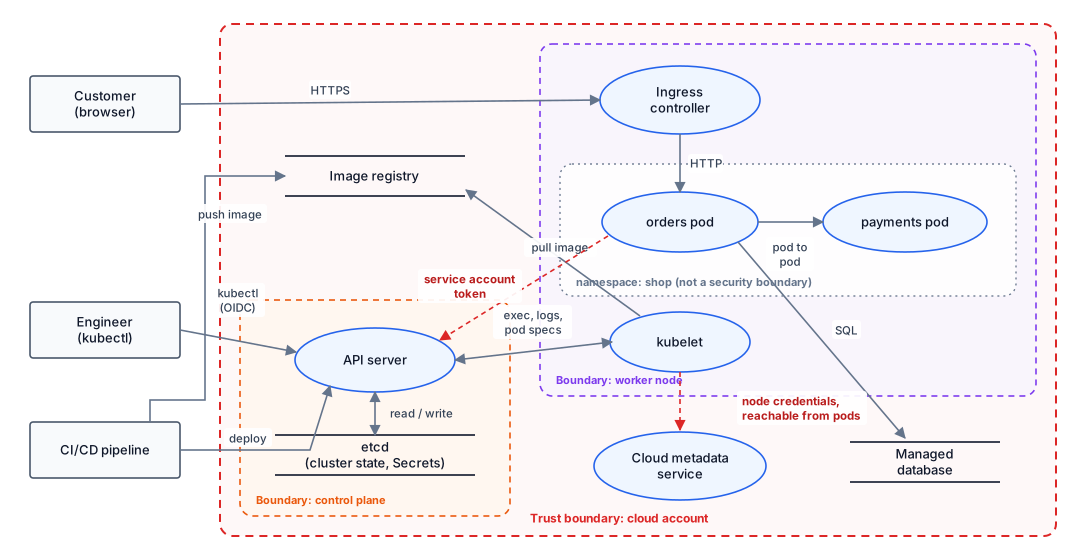
What to include
- The API server and etcd, even on a managed service where you never see etcd. Secrets live there, and so does every permission in the cluster.
- Every way into the API server. Engineers with kubectl, the CI/CD pipeline or GitOps controller that deploys, and the pods themselves. A pod calling the API server with its service account token is a data flow, and usually the one that matters most.
- The kubelet on each node type. It runs your containers, pulls images, and accepts exec and log requests.
- Shared add-ons: the ingress controller, service mesh, certificate manager, GitOps tool, monitoring agents. They often run with cluster-wide permissions, so they're among the most privileged workloads you have.
- Where images come from: the registry, and the pipeline that pushes to it. Our CI/CD threat modeling guide covers that side in depth.
- The cloud metadata service and any cloud APIs pods can reach. They are how a cluster compromise becomes a cloud account compromise.
Model each workload as a process, but don't draw every replica or every microservice. A pod that has its own service account, its own Secrets or its own network exposure gets its own element; identical replicas don't.
Step 3: Mark the boundaries that actually hold
This is where cluster diagrams most often mislead. A namespace looks like a strong boundary on a diagram, and a container looks sealed. Neither is, by default. Write down what each boundary depends on.
| Boundary | What it stops by default | What it takes to rely on it |
|---|---|---|
| Internet to ingress | Only what the ingress controller and load balancer refuse. | TLS, a patched ingress controller, and only the routes you mean to expose. |
| Namespace | Name clashes, and RBAC bindings scoped to it. Not network traffic, not node sharing. | Namespaced RBAC, a default-deny NetworkPolicy, and Pod Security Admission labels on every namespace. |
| Container | Ordinary processes from seeing each other. It shares the node's kernel. | Non-root, no privileged mode, no host mounts or host networking, dropped capabilities: the Restricted Pod Security Standard. |
| Node | Pods on other nodes, as long as nobody escapes to the host. | Separate node pools for workloads that must not share a kernel, and nodes that can't use their credentials outside their own scope. |
| Control plane | Anything RBAC denies. RBAC is only as tight as the bindings you've written. | Private or allow-listed API endpoint, scoped RBAC, audit logging, and Secrets encrypted at rest. |
| Cloud account | Cloud APIs, unless a pod can borrow the node's or its own cloud identity. | Workload identity with narrow roles, and pods blocked from the node's metadata credentials. |
If you can't tick the right-hand column for a boundary, draw it as a dotted line, as we did for the shop namespace, and model the threats as if it weren't there. That one change tends to surface most of a cluster's serious findings.
Step 4: Follow every identity
On Kubernetes, most serious attacks are a chain of borrowed identities: a bug in the app gives code execution, the pod's token gives API access, a broad role gives Secrets, and a Secret gives the cloud account. So list every identity that can act on the cluster, and for each one ask what it can reach.
| Identity | Questions to ask |
|---|---|
| Humans | How do they authenticate to the API server? Who has cluster-admin, and is it used day to day? Can a stolen laptop's kubeconfig be used from anywhere? |
| CI/CD and GitOps | What role does the deploy credential have? Could it be namespaced instead of cluster-wide? Who can change the pipeline or the Git repo it deploys from? |
| Service accounts | Does this pod need to call the API at all? If not, is the token mount turned off? If so, which verbs on which resources? |
| Controllers and operators | Which Secrets can the ingress controller, cert manager or GitOps tool read? Cluster-wide, or only where it needs to? |
| Nodes | What can the kubelet's credentials do? What cloud role does the node have, and can pods reach it? |
| Workload cloud identities | Which cloud roles are mapped to which service accounts? Could a pod in another namespace use the same role? |
When you review RBAC, look past the obvious get secrets. The Kubernetes documentation on RBAC good practices lists permissions that are effectively admin even though they don't look it:
- Creating pods (or Deployments, Jobs and anything else that creates pods) in a namespace lets you mount any Secret in that namespace and run as any service account in it. "Can deploy to
shop" means "can read every Secret inshop". escalate,bindandimpersonatelet an identity grant itself, or act as, something more powerful.pods/execandnodes/proxygive a shell in running containers, directly or through the kubelet.- Changing admission webhooks lets you see or alter every object as it's created.
Step 5: Walk each layer with STRIDE
The Kubernetes documentation's long-standing "4C" model splits cloud-native security into four layers: Cloud, Cluster, Container and Code. It works well as a checklist to make sure the model covers every layer. Apply STRIDE to the elements in each one.
| Layer | Typical threats |
|---|---|
| Cloud | Pods reading the node's cloud credentials from the metadata service (Elevation of Privilege). Workload roles broader than the workload needs. The API endpoint reachable from the whole internet. |
| Cluster | Over-broad RBAC bindings (Elevation of Privilege). Secrets in etcd without encryption at rest (Information Disclosure). No API server audit log (Repudiation). Outdated control-plane or node versions (Tampering). |
| Container | Privileged pods, host mounts or root users that make an escape easy (Elevation of Privilege). Images pulled by mutable tag from an unapproved registry (Tampering, Spoofing). No resource limits (Denial of Service). |
| Code | The app bugs that start the chain: remote code execution, server-side request forgery, or a dependency with a known exploit. These belong in each application's own model. |
Two technique catalogues are worth keeping open while you do this: Microsoft's Threat Matrix for Kubernetes and the Containers matrix in MITRE ATT&CK. Neither is a threat model, but both are good at pointing out a technique you forgot.
Step 6: Build attack trees for what matters most
STRIDE gives you a list of weaknesses. An attack tree shows how they combine into an incident. For a cluster, start with two or three goals an attacker would actually want, such as reading production Secrets, taking over the cloud account, or running code on every node. Here is the first one for the shop cluster.
- ORGoal: read the payments service's Secrets
- ANDUse the orders pod's identity
- Get code execution in the orders pod (an app bug)
- The service account token is mounted
- Its role can read Secrets, or create pods, in the payments namespace
- ANDEscape to the node
- Run a privileged or host-mounting pod (no Pod Security Admission)
- A payments pod is scheduled on the same node
- ANDSteal a deploy credential
- Compromise the CI/CD pipeline or its Git repo
- The deploy credential is cluster-wide
- Compromise a shared controller that can read every Secret, such as the ingress controller
- ANDUse the orders pod's identity
An OR node succeeds if any child does; an AND node needs all of its children.
The last branch isn't hypothetical. In March 2025, CVE-2025-1974 ("IngressNightmare") let anyone who could reach the ingress-nginx admission webhook from the pod network run code in the controller, which by default could read Secrets across the whole cluster. That's the risk of a widely shared, highly privileged add-on, and it's why controllers belong on the diagram.
Look at the AND gates: each one is a place where a single control cuts off the branch. Turning off the token mount, or scoping the role to its own namespace, breaks the first branch even if the app has a bug. Our attack tree examples show the same pattern for other goals.
Step 7: Score the threats and give them owners
Here are ten threats from the shop cluster, scored with the likelihood and impact scales from our risk matrix guide: 1–4 Low, 5–9 Medium, 10–15 High, 16–25 Critical. Likelihood assumes the attacker needs the stated foothold first; that's why few cluster threats score 4 or 5 for likelihood on their own.
| # | Threat | L | I | Score | First fix |
|---|---|---|---|---|---|
| K1 | Orders pod's service account token can read Secrets in the payments namespace | 3 | 5 | 15 High | Turn off the token mount; scope the role to its own namespace |
| K2 | SSRF in the orders app reaches the metadata service and gets the node's cloud credentials | 3 | 4 | 12 High | Block metadata from pods (on AWS, IMDSv2 with a hop limit of 1); use workload identity |
| K3 | No NetworkPolicies: a compromised orders pod reaches the payments pod's internal admin port | 3 | 4 | 12 High | Default-deny per namespace, then allow only the flows on the diagram |
| K4 | The CI/CD deploy credential is bound to cluster-admin | 2 | 5 | 10 High | One namespaced deploy role per app |
| K5 | Pod Security Admission isn't enforced, so a privileged pod can be scheduled and escape to the node | 2 | 5 | 10 High | Enforce Restricted on app namespaces, Baseline at minimum elsewhere |
| K6 | The ingress controller can read Secrets in every namespace | 2 | 5 | 10 High | Patch promptly; limit its Secret access to the namespaces it serves; don't expose its webhook to the pod network |
| K7 | The API server endpoint is public, so a leaked kubeconfig works from anywhere | 2 | 5 | 10 High | Private endpoint or an IP allow-list; short-lived OIDC credentials |
| K8 | No resource limits: one pod can starve every workload on its node | 3 | 3 | 9 Medium | Requests and limits, with a LimitRange per namespace |
| K9 | Images referenced by a mutable tag from a public registry | 2 | 4 | 8 Medium | Pin by digest; allow only your registry at admission |
| K10 | API server audit logging is off, so nobody can tell who read a Secret | 3 | 2 | 6 Medium | Turn on audit logs for Secrets, exec and RBAC changes |
What the scores tell you
- Five of the ten have impact 5. In a cluster, many small misconfigurations end at the same place: every Secret, or the whole account. That's why the likelihood side, the footholds, is where most of the work goes.
- The fixes are cheap compared with the risk. K1, K3 and K5 are each a few lines of YAML applied per namespace. Fixing them early also makes the scores of later findings fall, because they cut the chains in the attack tree.
- K10 scores low but matters after an incident. Without audit logs, you can't tell whether K1 was ever used. Score it honestly, then fix it alongside the others anyway.
Record each threat in a risk register with an owner, a treatment and the evidence that the fix is in place. Platform findings belong to the platform team, app findings to the app team, which is where the split from step 1 pays off.
Managed clusters: what moves to the provider
On EKS, GKE or AKS, the provider runs the control plane and etcd. Patching the API server, protecting etcd and keeping control-plane components available are theirs. You can mark those threats as transferred, with a link to the provider's shared responsibility documentation as evidence.
Everything else stays with you: who can reach the API endpoint, every RBAC binding, NetworkPolicies, Pod Security Admission, workload settings, add-ons, the mapping from service accounts to cloud roles, and on most node types the nodes themselves. Check what your provider does by default for Secret encryption, metadata access from pods and audit logging rather than assuming; the answers differ between providers and have changed over time.
Common mistakes
- Modeling the YAML instead of the system. Scanners that check manifests against a benchmark are useful, but they find settings, not attack paths. A cluster can pass a benchmark and still let one service account read every Secret.
- Treating namespaces as tenants. Namespaces are fine for teams that trust each other. For customers or untrusted code, use separate node pools or separate clusters.
- Leaving out the add-ons. Helm charts installed once from the internet often bring cluster-wide roles nobody reviewed. List them, and check their RBAC like any other identity.
- Stopping at the cluster edge. The cloud account and the CI/CD pipeline are part of the cluster's attack surface. If the deploy credential is cluster-admin, the pipeline is as sensitive as the cluster.
- Modeling once. Clusters change constantly. Revisit the platform model when you add an operator or a CRD, onboard a new team to the cluster, change how identities map to cloud roles, or upgrade across a major version. Our guide to when to re-threat-model has the general triggers.
Frequently asked questions
Is a Kubernetes namespace a security boundary?
Not on its own. A namespace scopes names, RBAC bindings and quotas, but pods in different namespaces share nodes and, without NetworkPolicies, can reach each other freely. It becomes a useful boundary only when RBAC, NetworkPolicies and Pod Security Admission are all scoped to it. For hostile tenants, use separate node pools or separate clusters.
Do I need to threat model a managed cluster like EKS, GKE or AKS?
Yes. The provider runs the control plane and etcd, so those threats move to the provider. You still own who can reach the API server, RBAC, NetworkPolicies, workload settings, node configuration on most node types, and how cluster identities map to cloud IAM. Those are where most cluster incidents start.
What is the 4C model of Kubernetes security?
Four layers, each depending on the one outside it: Cloud, Cluster, Container and Code. It is a useful checklist for making sure a threat model covers every layer, but it does not show how an attacker moves between layers. Use a data flow diagram and attack trees for that.
Which framework lists Kubernetes attack techniques?
Two are widely used: Microsoft's Threat Matrix for Kubernetes and the Containers matrix in MITRE ATT&CK. Both are catalogues of techniques. Use them to check your attack trees for missing branches, not as the threat model itself.
Running payments or customer data on Kubernetes for a regulated business? See threat modeling for fintech, or our guide to multi-tenant SaaS if several customers share one cluster.