Draw the system.
Get the attack trees.
ThreatTree matches about 800 known threats to the components in your data flow diagram, from API gateways and databases to AWS, Azure, GCP and Kubernetes services. Pick the ones that apply and the attack tree is built for you, grouped by what an attacker wants. You review the drafts; only what you accept reaches your risk register.
- No credit card
- ~700 threats
- 100 element types
- No AI involved


From diagram to reviewed attack tree
Real screens from the app, on the Invoicely example system from our threat model walkthrough.
-
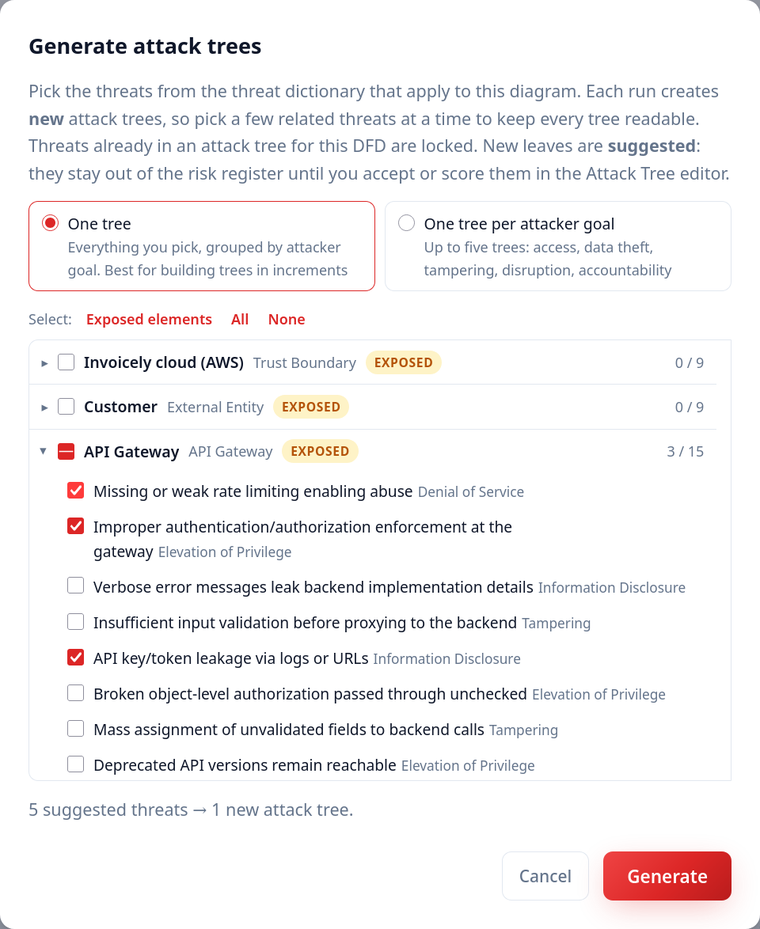
Pick threats for the parts of your system that face attackers
Click Generate attack trees in the DFD editor. Every component with known threats is listed. Components that talk to the outside world or sit on a trust boundary are flagged Exposed and listed first, because that's where most real attacks start. Tick threats one by one, a whole component at once, or every exposed component in one click. Nothing is selected for you.
-
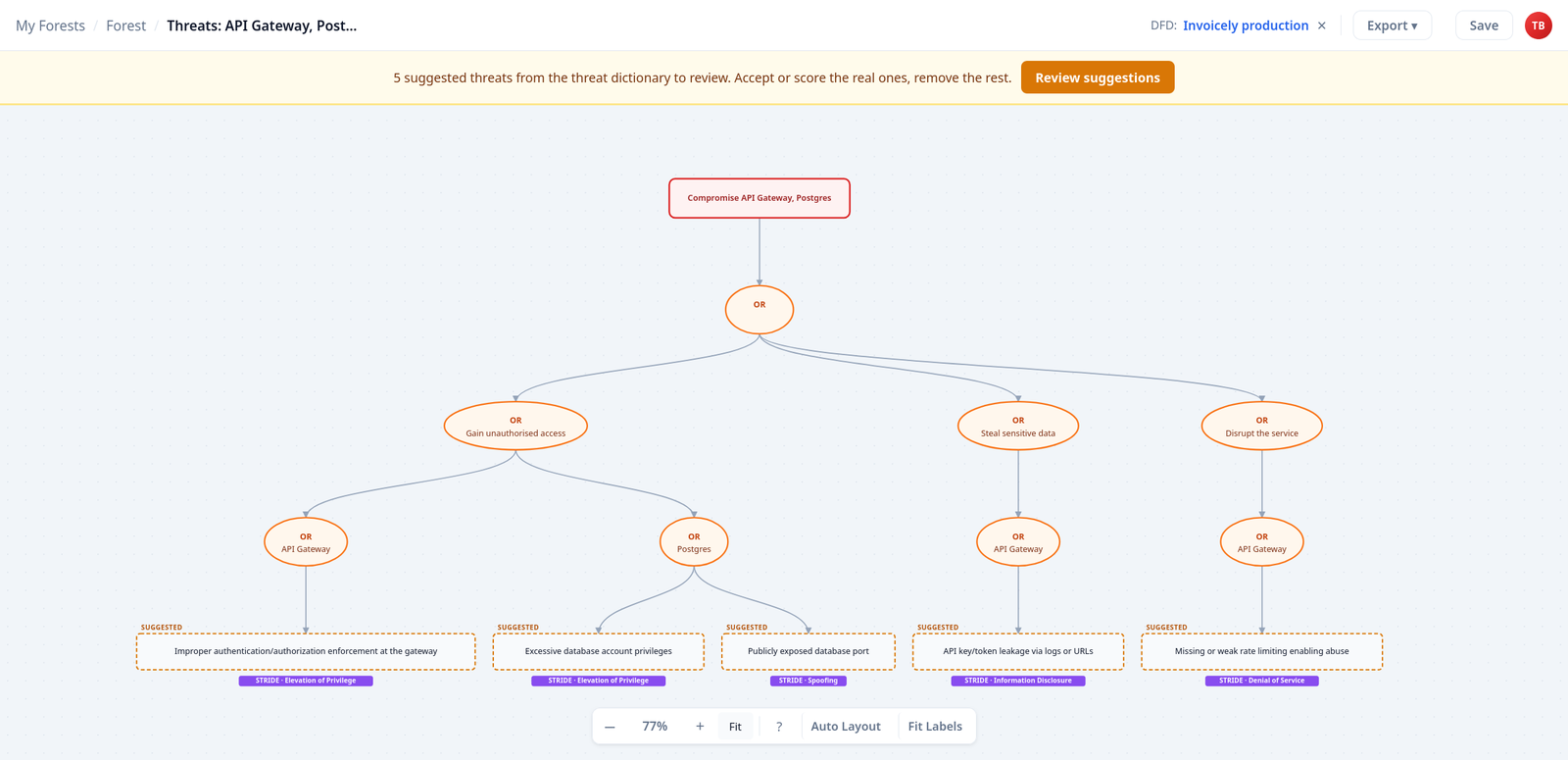
Get a structured attack tree in seconds
Threats are grouped by what an attacker wants: gain access, steal data, tamper with data, disrupt the service, or act without a trace. Under each goal, every component gets its own branch, and every threat arrives tagged with its STRIDE category and linked to the diagram it came from. Build trees in increments, for example the edge first and the data tier next: each run creates a new, readable tree, and a threat can only be used once per diagram.
-
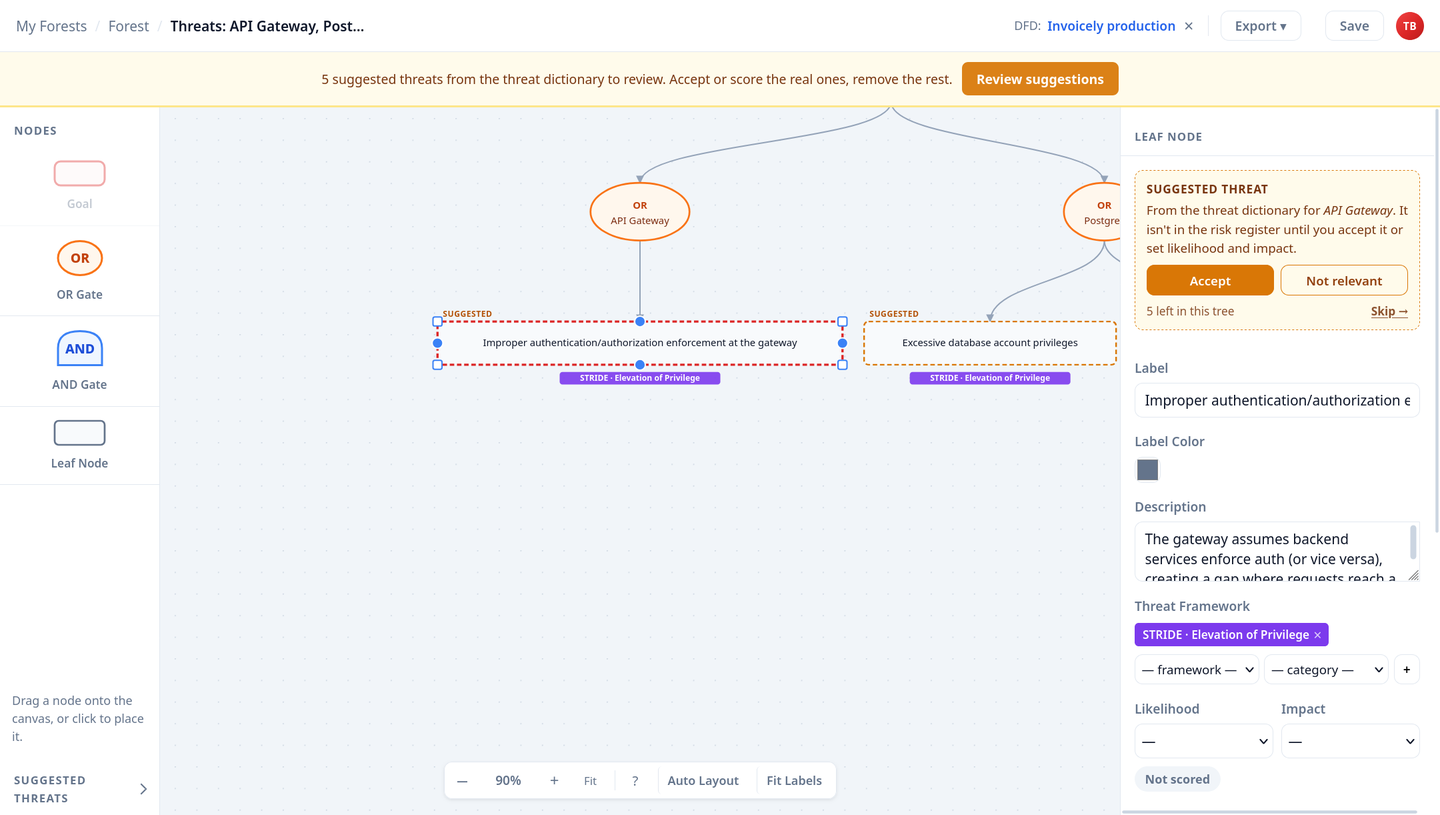
Review in minutes, keep a register you can defend
Generated threats arrive as suggestions, outside your risk register. Step through them with Review suggestions: accept the ones that are real, score them on likelihood and impact, and mark the rest as not relevant. The register only ever holds threats someone has looked at, which is exactly what an auditor or a board will ask about.

- ~700threats in the dictionary
- 100element types covered
- 5attacker goals to group by
- 0unreviewed rows in your register
Generated, then reviewed. Not dumped into a spreadsheet.
Most threat generators produce a long list per component and leave the triage to you. That's where threat models go to die. ThreatTree keeps the speed and drops the noise.
-
No 300-row backlog of noise
You choose what to generate, and suggestions stay out of the register until someone accepts them. The register stays short enough to act on.
-
Attack trees, not flat lists
Threats land in a real attack tree, grouped by attacker goal and component. Add the AND paths that chain them together, and see which control breaks the most routes.
-
Every risk has a decision
Accepted threats get a likelihood, an impact, a treatment and an owner, so the mitigations hold up in an audit.
-
Kept up to date
New threats appear in the generator as the dictionary grows. Suggestions you haven't touched pick up improved wording; your own edits are never overwritten.
-
No AI, no data leaving
Threats come from a curated dictionary matched to component types. Nothing about your architecture is sent to a language model, and the same input always gives the same tree.
-
Speaks your frameworks
Every generated threat is tagged with STRIDE. Add LINDDUN, OWASP Top 10, CAPEC or MITRE ATT&CK tags as you review.
About 800 threats across more than 110 element types
If you can draw it in the DFD editor, the dictionary very likely has threats for it.
Core DFD notation 4 types
Processes, data stores, external entities and trust boundaries.
Network and edge 8 types
Firewalls, WAFs, load balancers, CDNs, DNS servers, routers, network devices and API gateways.
Data and messaging 5 types
Databases, caches, message queues, storage servers and storage arrays.
Identity and compute 3 types
Identity providers, application servers and containers.
AWS 27 services
Including IAM, Lambda, RDS, DynamoDB, KMS, SQS, CloudFront and API Gateway.
Azure 23 services
Including Entra ID, Functions, SQL Database, Cosmos DB, Key Vault and Front Door.
Google Cloud 21 services
Including IAM, Cloud Functions, Cloud SQL, Firestore, Cloud KMS and Pub/Sub.
Kubernetes 3 types
Clusters, nodes and pods.
AI and LLM systems 7 types
LLM endpoints, AI agents and tools, RAG retrievers, vector stores, datasets and training pipelines, with the AI/ML Industry Module on Pro.
Three ways to get to an attack tree
Each has its place. Here's how they differ.
| Question | ThreatTree generator | Rule-based threat generators | Drawing by hand |
|---|---|---|---|
| You start from | Your DFD | Your diagram or model | A blank canvas |
| You get | Attack trees grouped by attacker goal | A threat list for every element | Whatever the team thinks of |
| What you pick | Only the threats you tick | Everything the rules match | Everything, from scratch |
| What gets reviewed | Each suggestion, before it reaches the risk register | The full generated list, during triage | Whatever you add |
| Attack paths | A tree to extend with AND steps | Usually a list per element | Built from scratch |
Rule-based generators, such as the Microsoft Threat Modeling Tool or IriusRisk, are a good fit for very large portfolios; see how ThreatTree compares. Prefer to start from scratch? Our attack tree template and guide to attack trees cover the manual route.
The attack tree generator, answered
What people ask before they try it.
Is the attack tree generator free?
Yes. It's included on every plan, including Free. Each generated tree counts towards your plan's attack-tree limit, which is 5 per data flow diagram on Free and unlimited on Pro.
Does it use AI?
No. The threats come from a curated threat dictionary, matched to the type of each component in your diagram. The same diagram and the same selection always produce the same tree, and nothing about your system is sent to an AI model.
Does generating attack trees replace threat modeling?
No. It gives you a structured starting point. The dictionary knows what commonly goes wrong with an API gateway or a database, not what is specific to your business logic, so your team still decides which threats are real, adds the ones only it can see, and adds the attack steps that chain them together.
Can I edit a generated attack tree?
Yes. A generated tree is an ordinary attack tree. You can rename nodes, add AND gates and attack steps, tag threats with LINDDUN, OWASP Top 10, CAPEC or MITRE ATT&CK, and score them.
What happens when the threat dictionary is updated?
New threats appear in the generator straight away. Suggested threats you haven't touched are updated to the latest wording the next time you open the generator. Threats you've accepted, scored or edited are never changed.
Can I generate the same threat twice?
No. Once a threat is in an attack tree linked to a diagram, it's locked in the generator for that diagram, so you can build several small trees in increments without duplicates. Deleting the threat from its tree makes it available again.
Your next attack tree is one diagram away.
Free plan, no credit card. Draw your system and generate your first tree in minutes.