Threat modeling software for security teams Every threat, tied to the system it threatens.
Draw your system as a data flow diagram, break each threat into an attack tree, and get a scored risk register with owners. One linked model, from design review to audit.
- Free plan, no credit card
- Optional AES-256 encryption
- Export anytime, no lock-in
Risk register

See it in the product
Real screens from the app — not mockups.
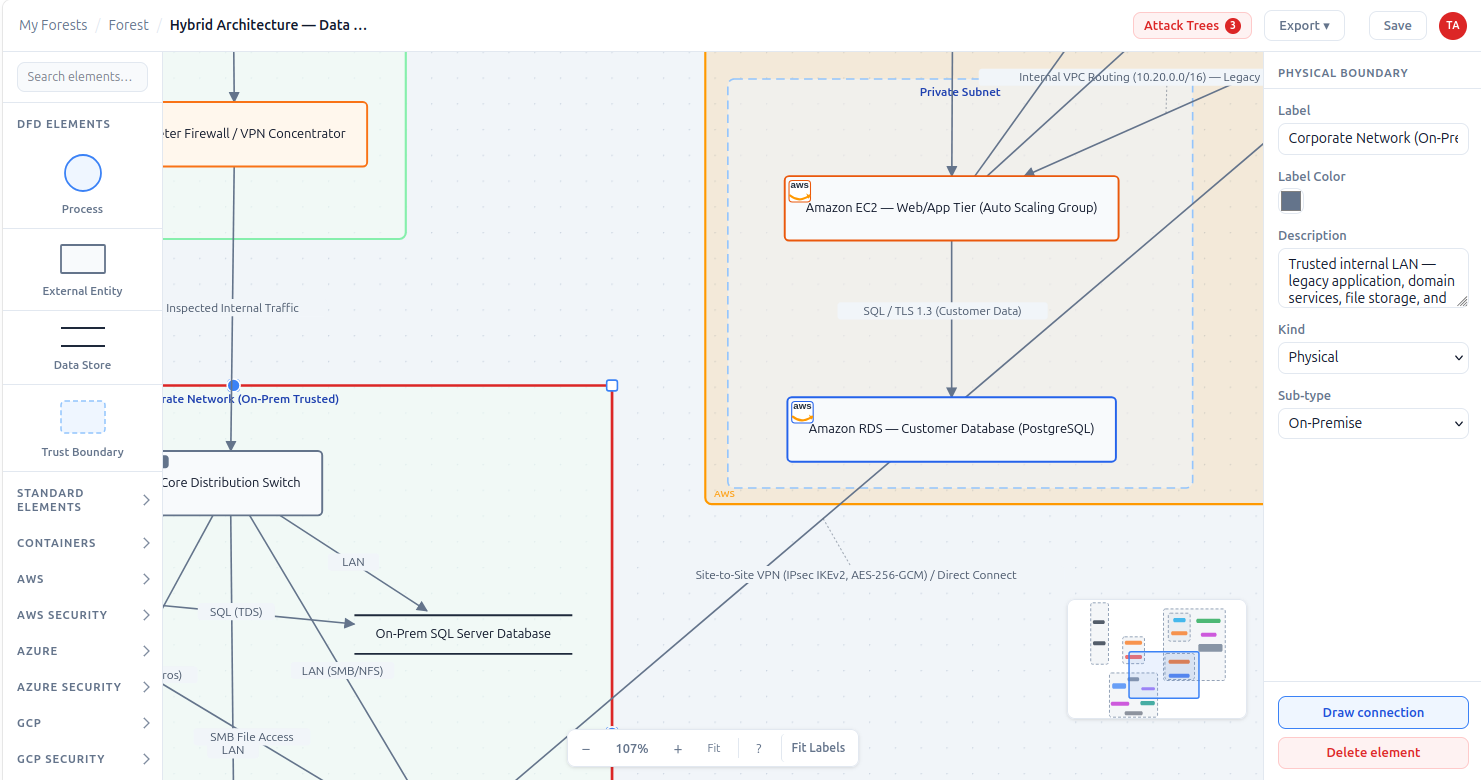
Map your architecture as a Data Flow Diagram
Trust boundaries, processes, data stores, and external entities — including AWS, Azure, and GCP-specific elements — so every threat is grounded in a real component of your system, not a floating assumption.
Generate attack trees from your diagram
Pick from about 800 known threats matched to the components you've drawn, from API gateways to AWS, Azure and GCP services, and ThreatTree builds the attack tree, grouped by what an attacker wants. Generated threats stay suggestions until you accept them, so your risk register only holds what someone has reviewed.
How the attack tree generator works →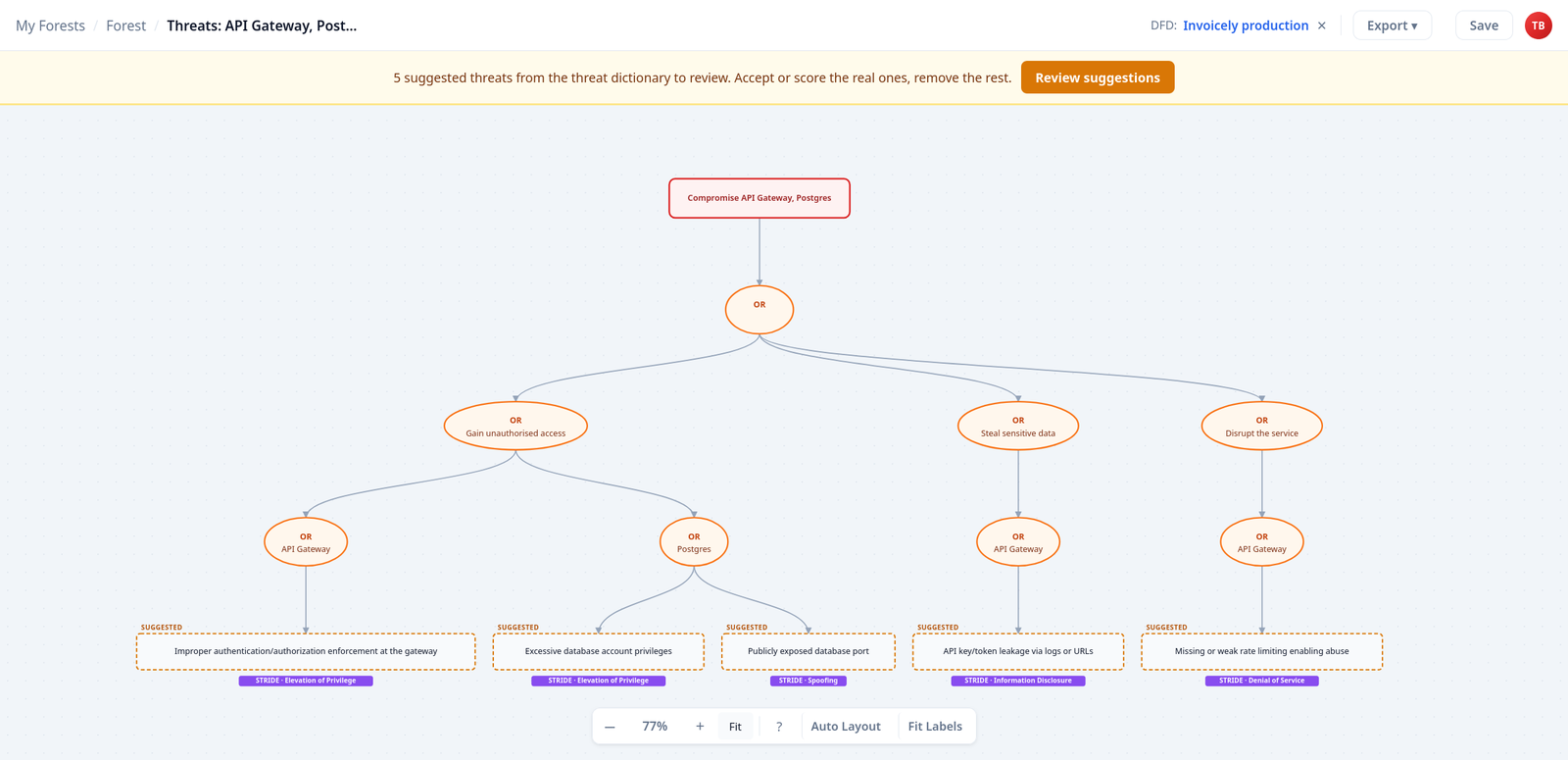
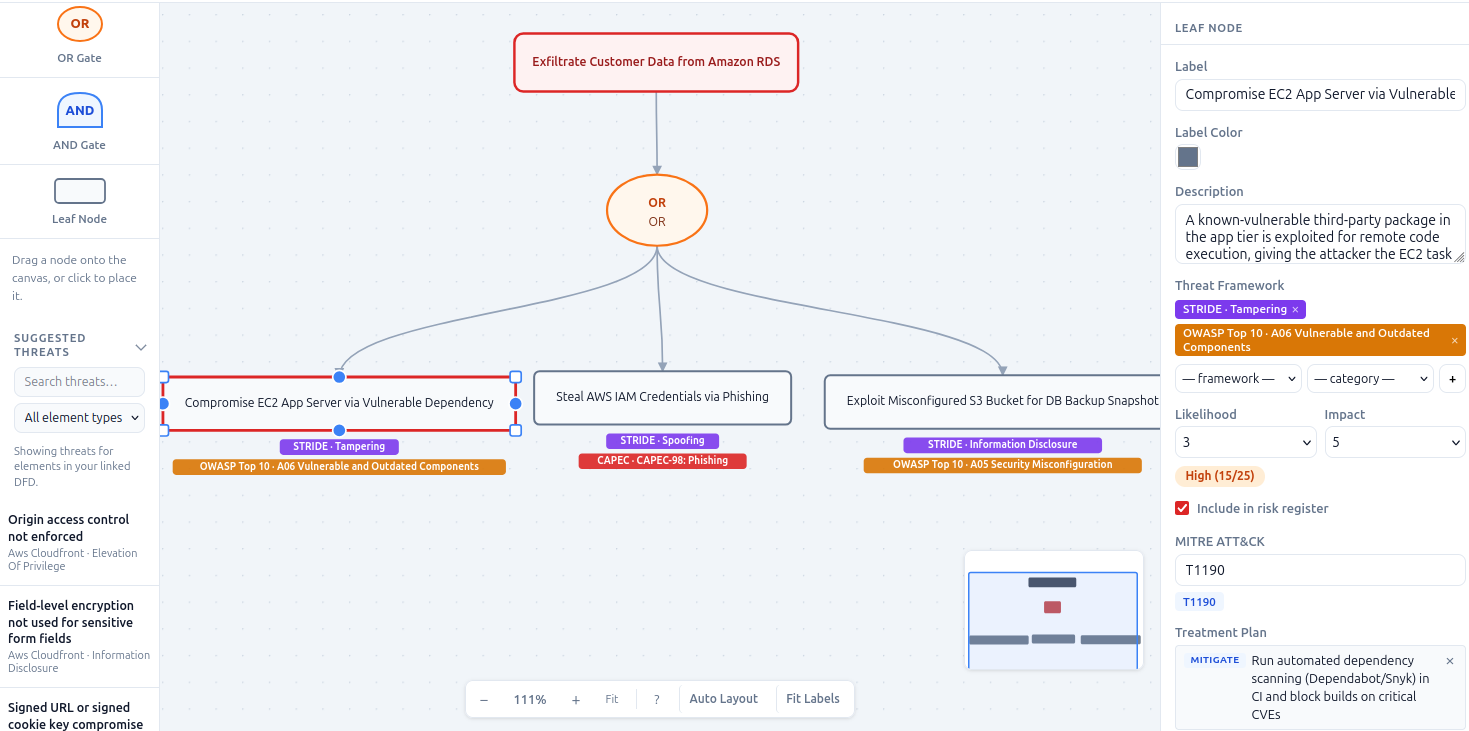
Decompose every threat into an Attack Tree
Break a threat down with AND/OR logic, from high-level goal to atomic attack step. Tag each step with STRIDE and CAPEC, and link the tree straight back to the DFD node it targets.
Structured threat intelligence.
Board-ready evidence.
ThreatTree gives you the precision to decompose threats to the atomic attack step, and the evidence to defend every risk decision — whether that's to a board, an auditor, or just your own future self.
-
Architecture-Anchored Threats
Model your system with DFDs — processes, data stores, trust boundaries, and external entities. Every threat is grounded in a real architecture element, not a floating assumption in a spreadsheet.
-
Attack Path Decomposition
Break each threat into an Attack Tree with AND/OR logic — from high-level attacker goal to atomic step. Every tree links back to the exact DFD node it targets, keeping risk grounded in your architecture.
-
Multi-Framework Threat Tagging
Tag every node with STRIDE, LINDDUN, OWASP Top 10, CAPEC, or MITRE ATT&CK. See which frameworks your model covers and where the gaps are — before an auditor or attacker finds them first.
-
Standards-Based Controls
Map every mitigation to ISO 27001:2022, NIST SP 800-53 Rev 5, CIS Controls v8, PCI DSS v4.0, NIST CSF 2.0, SOC 2, or the NIS2 Directive's Article 21 measures. Each control is traceable to a named standard — evidence your auditors and regulators recognize.
-
Prioritized Risk Register
Likelihood × Impact scoring generates a ranked risk register automatically across every tree in a forest. Know what to remediate first — backed by structured, auditable evidence rather than gut feel.
-
Board-Ready PDF Reports
Generate executive-ready reports with risk summaries, ranked registers, cross-reference tables, and architecture appendices in a single PDF. Designed for board presentations, audit submissions, and compliance reviews.
-
Team Collaboration & RBAC
Invite architects, developers, and compliance leads with owner, editor, or viewer roles. Everyone contributes to the same threat model — no version conflicts, no stale exports sent over email.
-
Optional AES-256 Forest Encryption
Choose to lock any forest with a browser-generated AES-256-GCM key. The server stores only ciphertext — your key never leaves your device unless you choose to email yourself a copy, and a full database breach exposes nothing readable. Available on every plan, including Free.
How we protect your data →
See every feature, by plan · How ThreatTree compares with other threat modeling software
How it works
From zero to a live risk register in five steps.
-
Create a Forest
Define scope, name your stakeholders, and invite your team. A forest is the container for everything that follows.
-
Add a Data Flow Diagram tree
Model your system — processes, data stores, trust boundaries, external entities — so every threat has a place to live in your architecture.
-
Add Attack Trees linked to your DFD
Generate attack trees from the DFD's components with the attack tree generator, or build them by hand. Either way, decompose each threat with AND/OR gates down to atomic attack steps.
-
Map & Prioritise Risks
Score nodes by likelihood and impact. A ranked risk register is generated automatically across all trees in the forest.
-
Share & Report
Export to PDF for board and audit submissions, JSON for programmatic use, or STIX 2.1 to feed your threat intelligence pipeline.
Frequently asked questions
Answers to what security teams and solo builders ask most before getting started.
Do I need a credit card to sign up?
No. The Free plan requires no payment information — just create an account and start building.
Can ThreatTree generate attack trees automatically?
Yes. From a data flow diagram, ThreatTree's attack tree generator lets you pick from about 800 threats matched to the components you've drawn and builds the attack trees for you, grouped by attacker goal and tagged with STRIDE. Generated threats are suggestions that stay out of the risk register until your team accepts or scores them. It's included on every plan, including Free.
How does forest encryption protect my threat models?
When you lock a forest, your browser generates a unique AES-256-GCM key, encrypts every node label, edge annotation, diagram name, and property locally, then downloads the key to your device as a JSON file. The server stores only ciphertext and never sees the key — unless you choose to email yourself a copy. Available on every plan, including Free — see the Security page for the full picture.
Why use ThreatTree instead of a spreadsheet or drawing tool?
Draw.io + Excel gets you started, but it doesn't link diagrams to risk entries, can't rank threats automatically, has no standards mapping, and produces no audit-ready PDF. ThreatTree keeps your DFD, attack trees, risk register, and control mappings in one place — so when someone asks why you prioritised a risk, the answer is traceable rather than anecdotal.
Can I export my data if I cancel or downgrade?
Yes. You can export any forest as JSON at any time — no lock-in. If you downgrade from Pro to Free, your forests are not deleted; you simply cannot create new ones beyond the Free limits until you upgrade again.
Start modeling threats today
Free plan available — no credit card required. Be up and running in minutes.