Most explanations of threat modeling stop at the theory: draw a diagram, apply STRIDE, prioritise. It sounds simple until you sit down with a real system and wonder what "apply STRIDE" actually produces, how detailed the diagram should be, or what a finished threat model looks like.
So this post works through one, start to finish, for a realistic system: Invoicely, a small SaaS app that lets businesses create invoices, email them as PDFs and get paid by card. It's fictional, but every part of it is common: a web API, a database, file storage, a background worker, a payment provider, an email provider and an internal admin console. Each step shows the actual artefact, not just a description of it, and the finished model is free to open in ThreatTree.
The short version: scope the system and its assets, draw a data flow diagram with trust boundaries, walk every element through STRIDE, decompose the most serious threat into an attack tree, score each step on likelihood and impact, and record every result in a risk register with a decision and an owner. For Invoicely that took about two hours with three people, and the most important finding was one nobody had thought of before the diagram existed.
Step 1: Scope and assets
Before any diagram, agree on what's being modeled and what matters. For this exercise the scope is the production Invoicely service: everything from the customer's browser to the database, including the support team's admin console. Out of scope: Stripe's and the email provider's internal systems (we model our integrations with them, not their infrastructure), and the marketing website.
| Asset | Why it matters |
|---|---|
| Invoices and customer records | Commercially sensitive: amounts, clients, addresses. A leak between customers would end the business. |
| Invoice PDFs | The same data, in a form that's easy to forward and hard to revoke. |
| Payment status | If it can be faked, customers stop trusting that "paid" means paid. |
| User accounts and sessions | The keys to everything above. |
| Availability at month end | Most invoices go out in the last three days of the month. |
The realistic threat actors are an external attacker after customer data, a malicious or curious customer probing other customers' invoices, a support agent misusing their access, and an opportunist with stolen credentials. That's a short list, and it's enough to keep the rest of the exercise grounded.
Step 2: The data flow diagram
Next, draw the system as a data flow diagram: external entities (rectangles), processes (ovals), data stores (parallel lines), data flows (arrows) and trust boundaries (dashed boxes). The goal isn't a perfect architecture diagram. It's a shared, accurate picture of where data goes and where trust changes. Our guide to building a DFD covers the drawing itself.
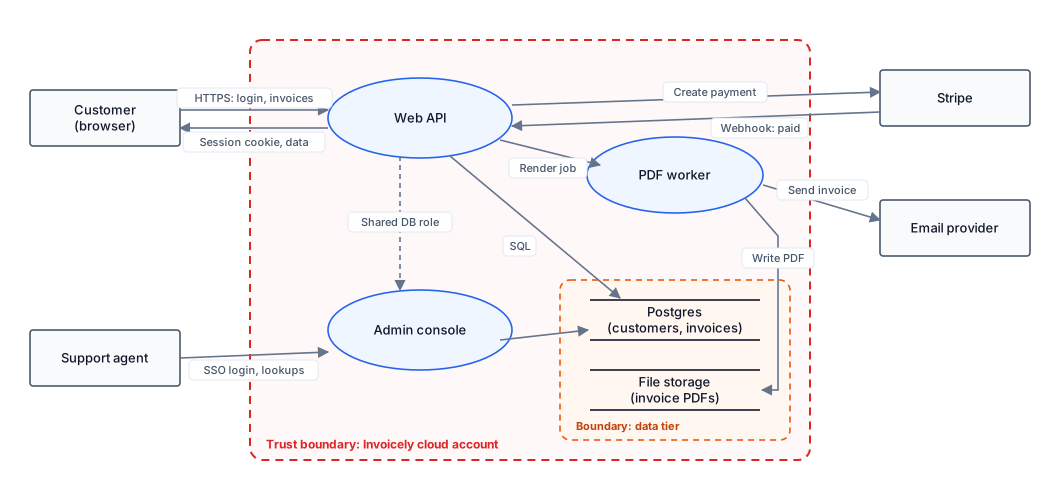
Two things came out of drawing it, before anyone had said the word "threat". First, the admin console and the customer API use the same database role, so the console can technically read and change anything. Second, invoice PDFs are written to file storage and emailed as links, so whoever has the link can open the file. Both look fine in an architecture slide. Both look very different once you draw the trust boundaries.
Step 3: The STRIDE sweep
Now take each element and flow in turn and ask the six STRIDE questions: can something be spoofed, tampered with, repudiated, disclosed, denied or used to escalate privilege? Start with anything that crosses a trust boundary. Our threat modeling checklist breaks each question into concrete prompts. Write each finding as a threat statement: [actor] can [action] because [weakness], resulting in [impact].
| # | Element | STRIDE | Threat |
|---|---|---|---|
| T1 | Web API | Spoofing | An attacker can take over customer accounts with leaked passwords because there's no rate limit or breached-password check on login. |
| T2 | Web API | Info disclosure | A customer can read another customer's invoices by changing the invoice ID in the API, because ownership is checked in the UI but not on every endpoint. |
| T3 | File storage | Info disclosure | Anyone with a PDF link can open the invoice because links don't expire and aren't tied to an account. |
| T4 | Stripe webhook | Tampering | An attacker can mark invoices as paid by sending a forged webhook if the signature isn't verified. |
| T5 | Admin console | Elevation | A support agent can read or change any customer's data because the console shares the API's database role. |
| T6 | Admin console | Repudiation | A support agent can look up or edit a customer record and deny it, because console actions aren't logged. |
| T7 | Web API | Tampering | An attacker can run script in a customer's session via stored XSS in an invoice note, because notes are rendered as HTML. |
| T8 | Browser session | Spoofing | Script running in the page can steal the session token because it's stored in localStorage rather than an httpOnly cookie. |
| T9 | PDF worker | Denial of service | A customer can stall invoice sending for everyone by queuing thousands of renders, because there's no per-account limit. |
| T10 | Email flow | Info disclosure | Invoice emails sent to a mistyped address expose the full invoice, because the PDF link works for anyone. |
Ten threats from one sweep is typical for a system this size. Several categories were "not applicable" for some elements, and saying so quickly kept the session moving. Note that T3 and T10 share a root cause (the open PDF link), and T7 and T8 only matter together, which is exactly what the next step is for.
Step 4: An attack tree for the threat that matters most
A flat list tells you what could go wrong. It doesn't show how threats combine, or which single fix closes the most paths. For that, pick the attacker goal that worries the business most and decompose it. For Invoicely, that's clearly "read another customer's invoices". OR gates are alternatives (any one path works); AND gates are steps that must all succeed.
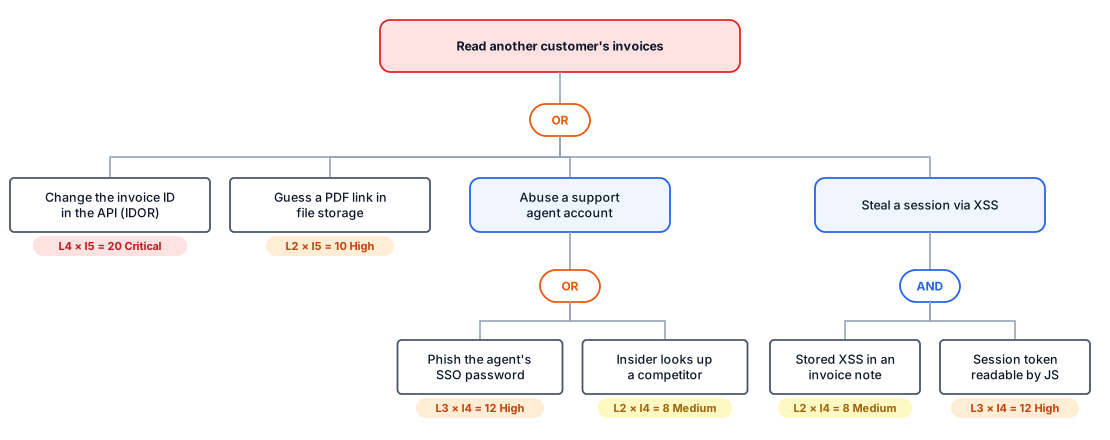
Three things stand out. The IDOR path (T2) needs no special skill, just a logged-in account and a browser's developer tools, so it scores highest. The support-agent paths exist only because of the shared database role (T5): fix that and the insider path shrinks to what the agent's role legitimately allows. And the XSS path is an AND: it needs both the stored XSS and a token readable by JavaScript, so moving the session into an httpOnly cookie breaks that whole branch even before the XSS is fixed.
Step 5: Score every threat
Score each threat on likelihood and impact from 1 to 5, and multiply. Use the context of this system rather than a generic severity: a missing rate limit matters more on a login page than on a settings page. Our post on CVSS versus threat model risk explains why. A simple banding keeps the conversation short: 1–4 Low, 5–9 Medium, 10–15 High, 16–25 Critical. Our risk matrix guide plots these ten threats on a 5×5 matrix and gives likelihood and impact scales to score against.
| # | Threat (short) | L | I | Score |
|---|---|---|---|---|
| T2 | IDOR on invoice endpoints | 4 | 5 | 20 Critical |
| T1 | Credential stuffing on login | 4 | 4 | 16 Critical |
| T5 | Admin console's shared DB role | 3 | 5 | 15 High |
| T8 | Session token readable by JS | 3 | 4 | 12 High |
| T4 | Forged payment webhook | 2 | 5 | 10 High |
| T3 | Non-expiring PDF links | 2 | 5 | 10 High |
| T9 | Render queue flooding | 3 | 3 | 9 Medium |
| T7 | Stored XSS in invoice notes | 2 | 4 | 8 Medium |
| T6 | No audit log in admin console | 3 | 2 | 6 Medium |
| T10 | Mistyped email exposes invoice | 2 | 3 | 6 Medium |
Step 6: The risk register
Scoring isn't the end. Each threat needs a treatment (mitigate, avoid, transfer or accept), an owner who answers for it, and the work as tickets. Accepting a risk is a legitimate decision, as long as someone with authority makes it and it has a review date; our post on why risk registers turn into backlogs explains what goes wrong otherwise. Here are the top entries for Invoicely:
| # | Treatment | Action | Owner |
|---|---|---|---|
| T2 | Mitigate | Enforce ownership checks in a shared authorisation layer for every invoice and PDF endpoint; add tests that call each endpoint as another tenant. | Engineering lead |
| T1 | Mitigate | Rate-limit logins, block breached passwords, and offer authenticator-app two-factor. | Engineering lead |
| T5 | Mitigate | Give the admin console its own database role with read-only access to the fields support needs; route edits through the API. | Head of support + platform |
| T8 | Mitigate | Move the session into an httpOnly, SameSite cookie. Breaks the XSS branch of the attack tree on its own. | Engineering lead |
| T3 / T10 | Mitigate | Replace open PDF links with short-lived signed URLs that require sign-in to regenerate. | Product + engineering |
| T4 | Mitigate | Verify Stripe webhook signatures and reject replays (already supported by Stripe's libraries). | Engineering lead |
| T10 | Accept (residual) | After signed URLs, the remaining risk of a mistyped address is accepted; reviewed in six months or if email delivery changes. | CEO |
Our guide to writing mitigations auditors accept covers how specific each action should be, and prioritising a backlog of threats covers what to do when the list is longer than this one.
What made this threat model useful
- The diagram did half the work. The two most important issues, the shared database role and the open PDF links, became obvious the moment the trust boundaries were drawn.
- The attack tree changed the order of work. Without it, closing the session-theft path looked like it meant hunting down every XSS bug. With it, the httpOnly cookie, a small change, turned out to break that whole branch.
- Every threat ended up with an owner. A list of ten problems is a worry. Ten entries with treatments and owners is a plan.
- It has a re-review trigger. Invoicely plans to add bank-transfer payouts next quarter, a new flow across a trust boundary, so the model gets revisited then; see when to re-threat-model.
Frequently asked questions
What does a finished threat model contain?
A scope and list of assets, a data flow diagram with trust boundaries, the threats found (usually through STRIDE), any attack trees for the most serious goals, a likelihood and impact score for each threat, and a risk register entry for each with a treatment decision and an owner.
How long does a threat model like this take?
For a system the size of Invoicely, about two hours with three people: thirty minutes on scope and the diagram, an hour on the STRIDE sweep, and thirty minutes on the attack tree, scoring and owners. Larger systems are best split into several sessions.
Do I need an attack tree for every threat?
No. Build attack trees for the one or two goals that worry the business most. They show how threats combine and which single fix closes the most paths, which a flat list can't.
How often should the threat model be updated?
Whenever the system changes in a way that affects trust boundaries or data: a new integration, a new type of data, a change to authentication. Review it at least once a year even without such a trigger.
Want to try this on your own system? The free templates include a data flow diagram, an attack tree and a STRIDE risk register you can fill in. For how this example maps to compliance, see threat models as SOC 2 evidence.