Most explanations of attack trees stop at the definition: a goal at the top, AND and OR gates in the middle, attack steps at the bottom. That's easy to agree with and hard to apply. What helps is seeing a few finished trees for goals you actually worry about, and what each one tells you to fix first.
Here are five, each for a different kind of attacker goal: taking over an account, stealing data from cloud storage, ransomware, payment fraud and compromising a build pipeline. Every leaf is scored, and each example ends with the controls the tree points to.
How to read these trees: an OR gate means any one child is enough; an AND gate means the attacker needs every child. Each leaf is scored likelihood × impact on a 1–5 scale, using ThreatTree's bands: 1–4 Low, 5–9 Medium, 10–15 High, 16–25 Critical (our risk matrix guide explains how to score consistently). A useful rule of thumb when you compare branches: an OR branch is as easy as its easiest child, and an AND branch is only as easy as its hardest one. The scores describe a typical SaaS product; yours will differ.
1. Take over a customer account
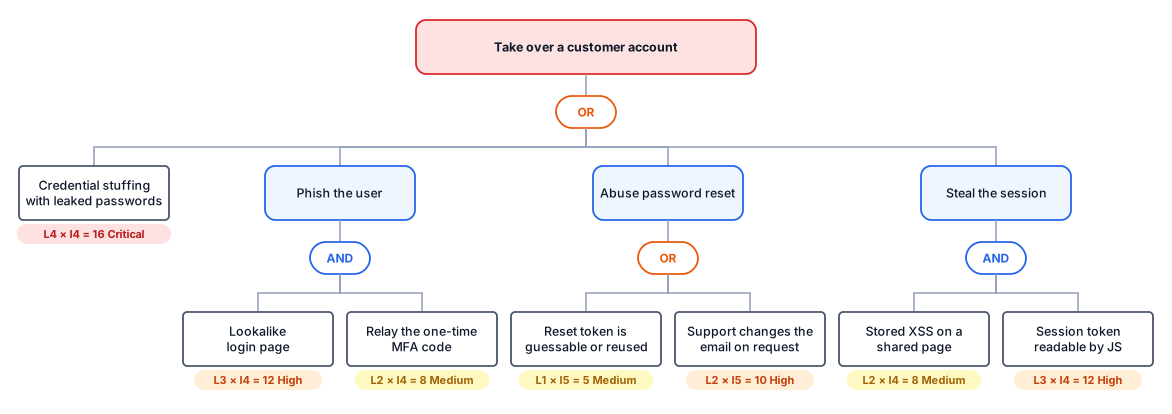
Account takeover is the attack most customer-facing products face first. The goal is concrete, the attackers are plentiful, and the four routes below appear in almost every system with a login.
What the tree tells you
- The cheapest path is the dullest one. Credential stuffing scores 16 because it needs nothing but a list of leaked passwords and patience. It's the leaf to fix first.
- Both AND branches have a weak link you control. Phishing only works if the one-time code can be relayed, and session theft only works if script can read the token. Phishing-resistant MFA, such as passkeys or security keys, breaks the first branch; an httpOnly cookie breaks the second.
- One leaf isn't code at all. "Support changes the email on request" is a process. No scanner will find it, which is exactly why it belongs in the tree.
Controls: rate limiting and breached-password checks on login, MFA with a phishing-resistant option, session tokens in httpOnly, SameSite cookies, single-use reset tokens that expire quickly, and a verification step before support changes an account's email.
2. Download customer files from cloud storage
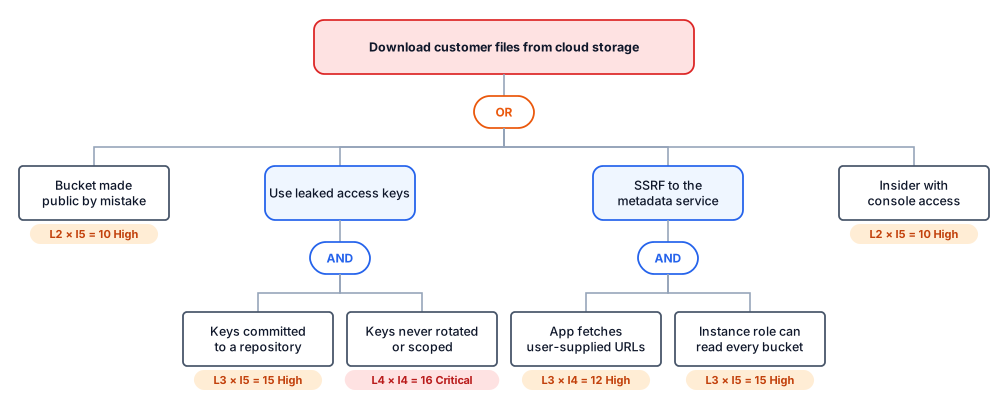
The goal here is data, and the target is an object storage bucket holding customer uploads or exports. The interesting part of this tree is how two very different routes depend on the same weakness.
What the tree tells you
- One control breaks two branches. Leaked keys and SSRF both succeed because a credential can read every bucket. Scope the instance role and the keys to the buckets they actually need, prefer short-lived credentials, and both branches lose most of their impact.
- The highest-scoring leaf is a hygiene problem. "Keys never rotated or scoped" scores 16 because long-lived keys are common and turn any leak into a breach.
- The public bucket is a single, preventable mistake. An account-wide block on public access makes that leaf go away entirely.
Controls: least-privilege roles per workload, short-lived credentials instead of static keys, secret scanning on every repository, an account-level block on public buckets, requiring session tokens for the instance metadata service (IMDSv2 on AWS), validating outbound URLs the app fetches, and access logging with alerts on bulk downloads. Our guide to threat modeling cloud infrastructure goes further.
3. Force the business to pay a ransom
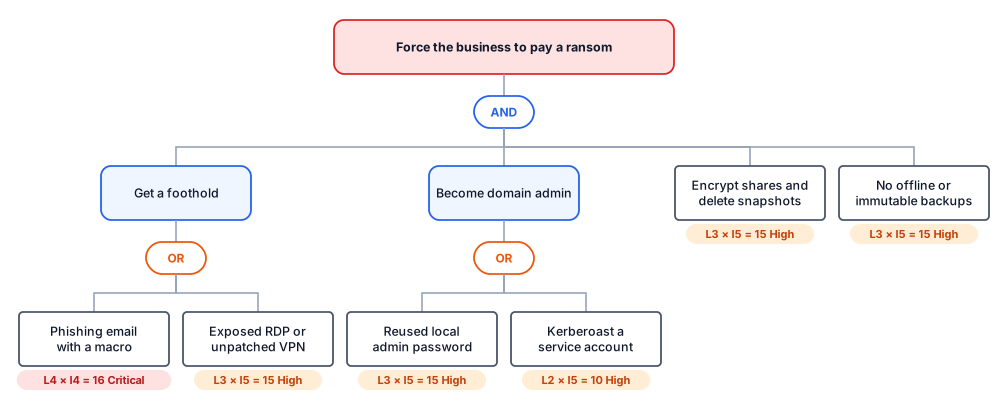
Most attack trees have an OR at the top. This one has an AND, and that changes how you defend it.
What the tree tells you
- You don't have to block every way in. Initial access has two cheap options, and there will always be another phishing email. But the goal needs all four branches, so breaking any one defeats it.
- The cheapest branch for you to break is the backups. Offline or immutable backups that have actually been restored don't stop encryption, but they remove the reason to pay. That's why it's the leaf most worth investing in.
- The tree also shows its own gap. Modern ransomware often steals data before encrypting it and threatens to publish it. Add that as another branch, and backups alone no longer break the goal.
Controls: offline or immutable backups with regular restore tests, unique local admin passwords, no internet-facing RDP, prompt VPN patching, MFA on remote access, and strong passwords or managed accounts for service accounts. Ransomware threat modeling covers the double-extortion branch in detail.
4. Get goods or money without paying
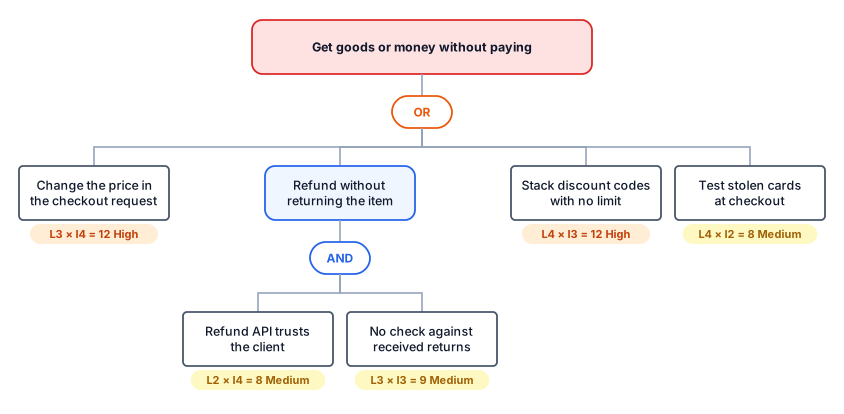
Not every attacker wants data. In anything with checkout, refunds or billing, the goal is money, and most of the leaves are business-logic flaws rather than classic vulnerabilities.
What the tree tells you
- Two leaves tie for first, for different reasons. Tampering with the price is high impact; stacking discount codes is very likely, because people share codes and try combinations without thinking of it as an attack.
- The refund branch needs two failures. An API that trusts the client and no reconciliation with returns. Fixing either breaks it; reconciliation also catches mistakes that aren't attacks.
- Card testing is low impact for you but not for your payment provider. It often matters more for fees and chargeback ratios than for direct losses.
Controls: look prices and totals up on the server and never accept them from the client, tie refunds to a received return, set limits and combination rules on discount codes, and rate-limit checkout attempts with fraud screening. Writing these as abuse cases on the checkout stories is the fastest way to get them into the backlog.
5. Ship malicious code to production
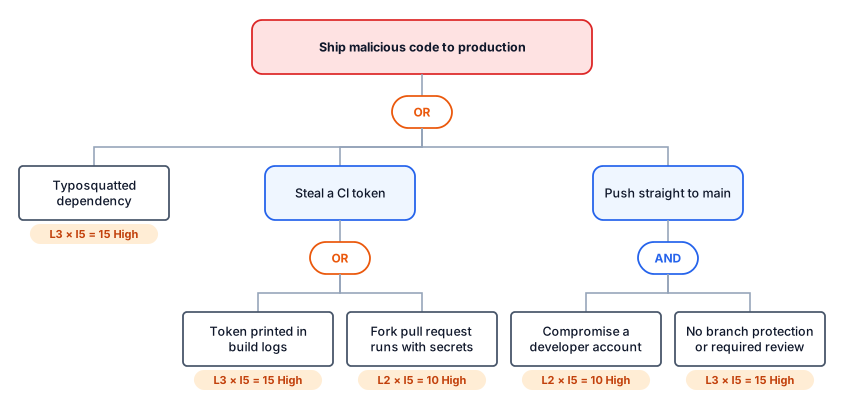
The last example targets the path code takes to production rather than the product itself. A successful attack here doesn't steal data directly; it puts the attacker's code inside everything you ship.
What the tree tells you
- Impact is 5 everywhere, so likelihood decides. That makes this tree a ranking of how easy each route is, and the two easiest are a typosquatted dependency and a token in build logs.
- Branch protection breaks a whole branch on its own. A compromised developer account can't push to main if every change needs a second reviewer.
- Secrets in CI are the common thread. Two of the five leaves are about CI credentials leaking, either into logs or into workflows that run untrusted pull-request code.
Controls: lockfiles and review of new dependencies, masked and short-lived CI credentials, never running untrusted pull-request code with access to secrets, protected main branches with required review, and MFA for everyone who can merge. See threat modeling your CI/CD pipeline and supply chain threat modeling for the full picture.
What the five trees have in common
- The cheapest path is rarely the cleverest. Credential stuffing, discount stacking and leaked keys beat every sophisticated branch on likelihood.
- AND branches are where defenders have leverage. Breaking any one child breaks the branch, and with an AND at the root, as in the ransomware tree, it breaks the whole goal.
- One control often breaks several branches. Least privilege in the cloud tree, phishing-resistant MFA in the account tree. You only see that when the routes are drawn side by side, which is the main reason to use a tree instead of a list.
- Processes belong in the tree. Support desks, refund workflows and code review are attack surface. A tree that only contains code misses them.
Turning an example into your own tree
- Start from the closest goal, and restate it in your business's terms: "read another clinic's patient records" is better than "steal data".
- Replace the leaves with your components. Use your data flow diagram to check that every leaf maps to something real, and add the processes around it.
- Rescore every leaf in your context. A leaf that is Critical for a consumer app with millions of logins might be Low for an internal tool behind SSO.
- Decide on each leaf that matters: mitigate, accept, transfer or avoid, with an owner. That's what turns a tree into a risk register.
For a blank starting point, use the free attack tree template. To see a tree in the context of a whole threat model, from scope to register, read our complete threat model example.
Frequently asked questions
What makes a good attack tree example?
A goal stated in business terms, such as "take over a customer account" rather than "exploit the app", two or three levels of decomposition, leaves concrete enough to test or fix, and a score on every leaf so you can see which path is cheapest for the attacker.
How deep should an attack tree go?
Stop when a leaf is something you can score and act on. For most product teams that is two or three levels below the goal. Going deeper is only worth it for the branch you are about to spend money on.
How do you score an attack tree?
Score each leaf on likelihood and impact, for example 1 to 5 each, and multiply. A common rule of thumb for rolling scores up is that an OR node is as likely as its easiest child, and an AND node is only as likely as its hardest child, because the attacker needs every step.
Can I reuse these attack tree examples for my own system?
Yes, as a starting point. Keep the goal if it fits, replace the leaves with the components and processes your system actually has, and rescore every leaf in your context. The scores here describe a typical SaaS product, not yours.
Building trees for a regulated product? The automotive standard ISO/SAE 21434 requires attack-path analysis as part of its TARA; our worked TARA example builds one step by step, and threat modeling for automotive covers the rest.