Free on every plan

SaaS threat model examples for the stack you actually run

Four complete threat models of how SaaS apps are built today, from a Laravel app on shared hosting to multi-tenant AI on AWS and Azure + Google Cloud. Each has a data flow diagram, two attack trees and a scored risk register. Open the closest one and make it yours.

  • No credit card
  • Opens as an editable draft
  • Doesn't use up a Free forest until you save it
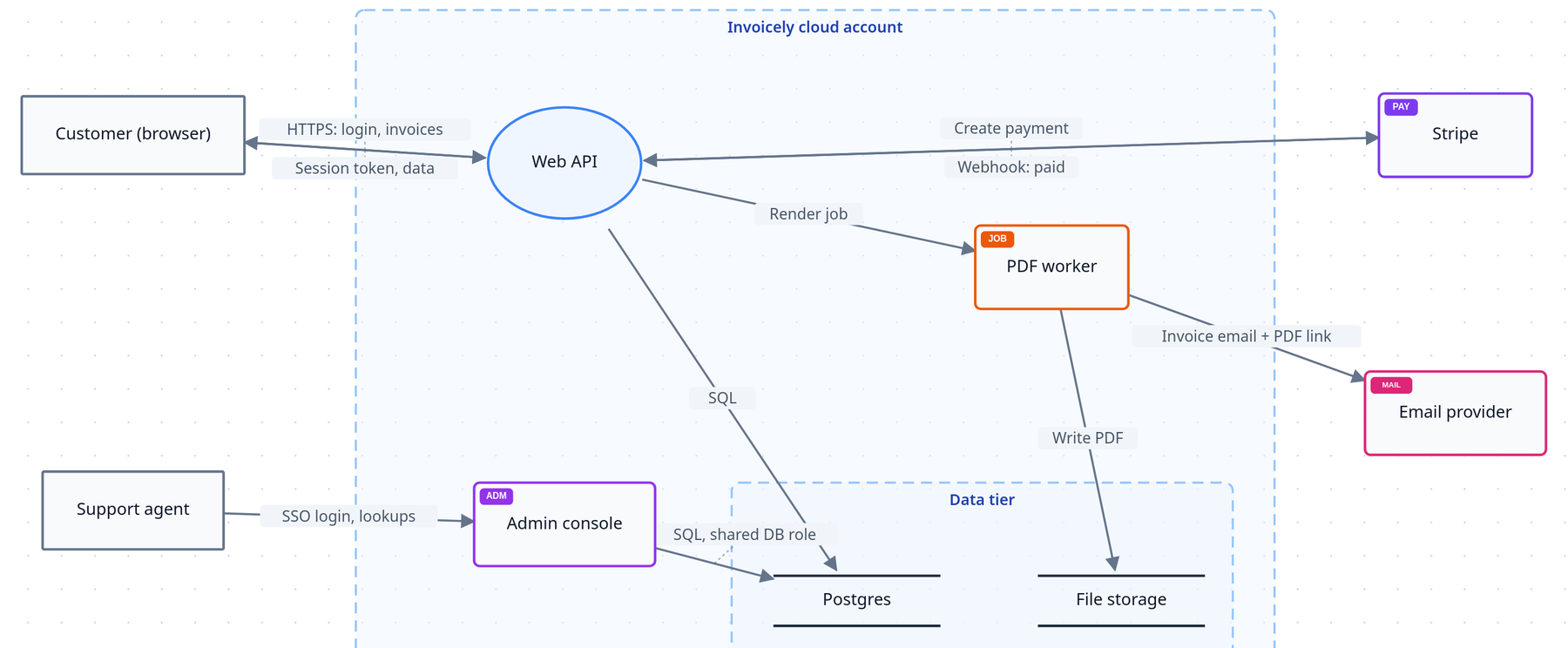
Data flow diagram of Invoicely: a customer and a support agent outside the Invoicely cloud account; inside it a Web API, an admin console and a PDF worker; a data tier with Postgres and file storage; Stripe and an email provider outside.

Real diagrams, exactly as they open in ThreatTree.

More software ships every week. Most of it is never threat modeled.

AI coding tools let a two-person team ship in a weekend what used to take a quarter. The architecture decisions that decide whether one bug leaks every customer's data still get made, just faster and without a security review. A finished example turns "we should threat model this" into twenty minutes of relabelling.

The same stacks, the same mistakes

An exposed .env file, a missing tenant filter, a deploy role any repository can assume. These repeat across thousands of apps built the same way. The examples are built around them.

AI features add new ways in

Prompt injection, a runaway model bill, retrieval that crosses tenants, model output rendered as HTML. Three of the examples model these alongside the classic web risks.

A model you can show

Every risk has a score, a treatment and an owner, so the first enterprise security questionnaire gets an answer that isn't "we haven't looked yet".

The four examples

Ordered from simplest to most distributed. Each opens free in ThreatTree as a draft you can explore, edit and save.

01
Simple

Invoicely SaaS invoicing app

The classic web SaaS: a web API, an admin console for support staff, Stripe payments, a PDF worker and file storage. If your stack is a framework app on a managed cloud with a database and a payment provider, start here.

  • Web API
  • Admin console
  • Postgres
  • File storage
  • Stripe
  • Email provider
Data flow diagram of Invoicely: a customer and a support agent outside the Invoicely cloud account; inside it a Web API, an admin console and a PDF worker; a data tier with Postgres and file storage; Stripe and an email provider outside.
The Invoicely data flow diagram, as it opens in ThreatTree.

Key risks in the model

ThreatScoreFirst fix
Read another customer's invoice by changing its ID20 CriticalEnforce ownership in one shared authorisation layer
Credential stuffing on login16 CriticalRate limits, breached-password checks, two-factor sign-in
Session token readable by JavaScript12 HighMove the session into an httpOnly cookie
Forged Stripe "paid" webhook10 HighVerify webhook signatures and reject replays

1 data flow diagram · 2 attack trees · 10 scored risks (2 critical), each with a treatment and an owner
02
Shared hosting + AI

Quillpad AI writing assistant

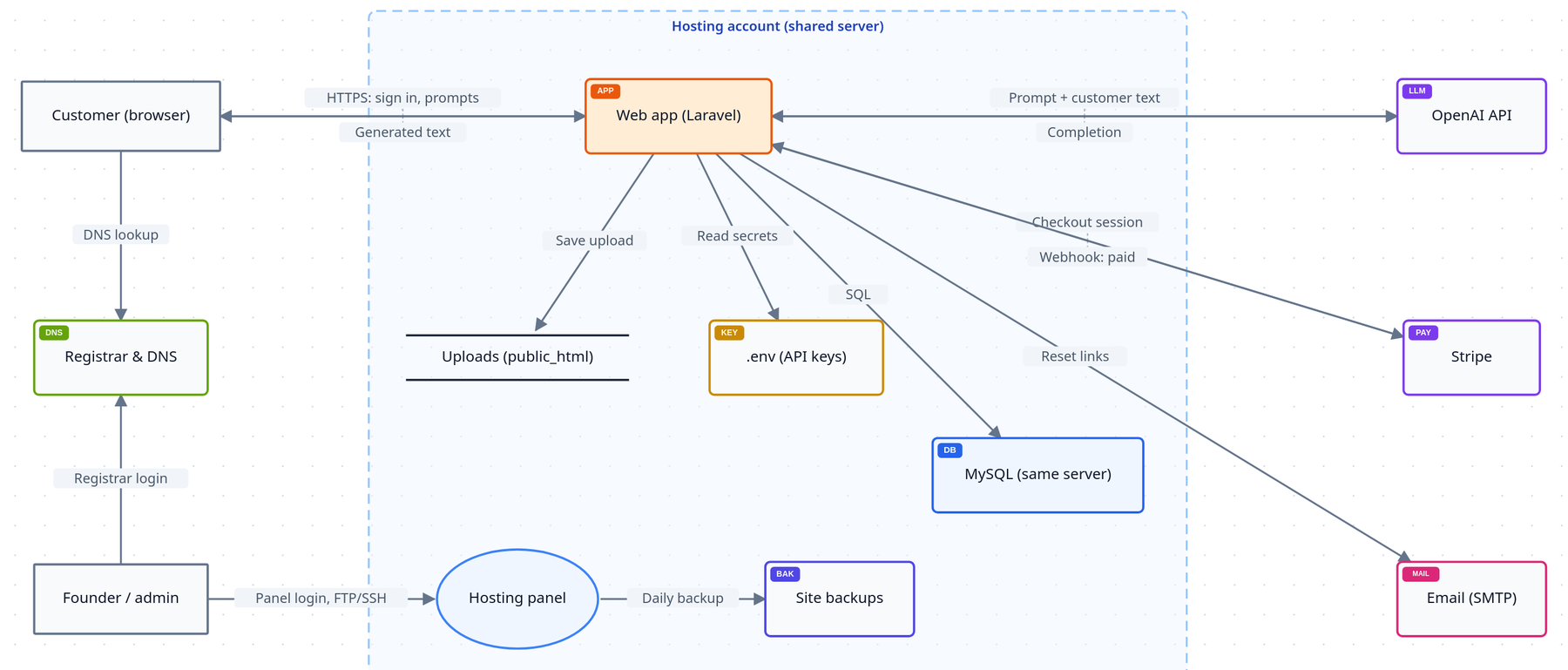
How most bootstrapped SaaS starts: a Laravel app and MySQL on one Hostinger or GoDaddy-style hosting plan, the OpenAI API for the AI features, Stripe for billing and the host's SMTP for email. The threats here are about the server, the hosting account and the AI bill.

  • Shared or VPS hosting
  • hPanel / cPanel
  • Laravel
  • MySQL
  • OpenAI API
  • Stripe
  • Registrar & DNS
Data flow diagram of Quillpad: a customer, the registrar and DNS, and the founder outside a shared hosting account; inside it the Laravel web app, uploads in public_html, the .env file, MySQL, the hosting panel and site backups; the OpenAI API, Stripe and SMTP email outside.
The Quillpad data flow diagram, as it opens in ThreatTree.

Key risks in the model

ThreatScoreFirst fix
Read another user's saved drafts (IDOR)16 CriticalLoad records through the signed-in user, never by bare ID
Bots run up the OpenAI bill16 CriticalPer-plan quotas, max_tokens, a hard budget on the API project
Download .env or a backup zip15 HighServe only the public/ folder; deny dotfiles and archives
Take over the hosting panel or FTP15 High2FA everywhere, SSH keys instead of FTP

1 data flow diagram · 2 attack trees · 12 scored risks (2 critical), each with a treatment and an owner
03
AWS + AI

Lexibase AI document assistant

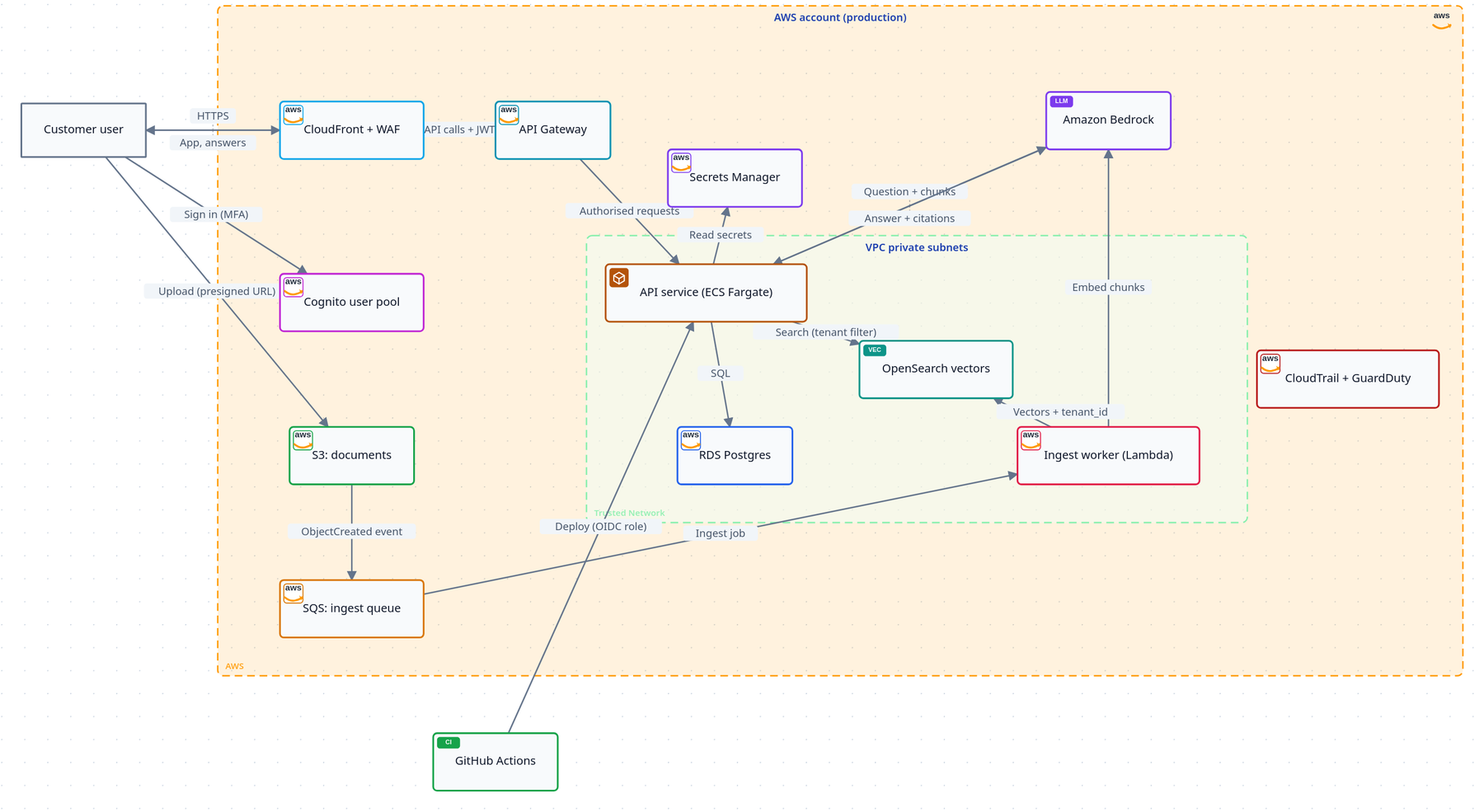
A multi-tenant B2B app on AWS where customers upload documents and ask questions answered by Amazon Bedrock with citations (retrieval-augmented generation). CloudFront and WAF in front, Cognito for sign-in, ECS Fargate for the API, an S3 to SQS to Lambda ingest pipeline, an OpenSearch vector index, RDS, and GitHub Actions deploying through OIDC.

  • CloudFront + WAF
  • Cognito
  • API Gateway
  • ECS Fargate
  • S3 · SQS · Lambda
  • OpenSearch
  • Amazon Bedrock
  • RDS
Data flow diagram of Lexibase on AWS: a customer user outside the AWS account; inside it CloudFront and WAF, API Gateway, Cognito, S3, SQS, Secrets Manager, Amazon Bedrock and CloudTrail; a VPC with the ECS Fargate API service, RDS Postgres, OpenSearch vectors and the Lambda ingest worker; GitHub Actions deploying from outside.
The Lexibase data flow diagram, as it opens in ThreatTree.

Key risks in the model

ThreatScoreFirst fix
Retrieval skips the tenant filter20 CriticalApply the tenant from the verified token in one retrieval function
User rewrites their tenant claim in Cognito15 HighRemove write access to custom:tenant_id from the app client
SSRF via "import from URL" steals the task role15 HighFetch URLs from an isolated worker with no IAM role
GitHub OIDC trust allows any repository10 HighPin the trust policy's sub to your repo and environment

1 data flow diagram · 2 attack trees · 10 scored risks (1 critical), each with a treatment and an owner

04
Azure + Google Cloud

Teamscope People analytics

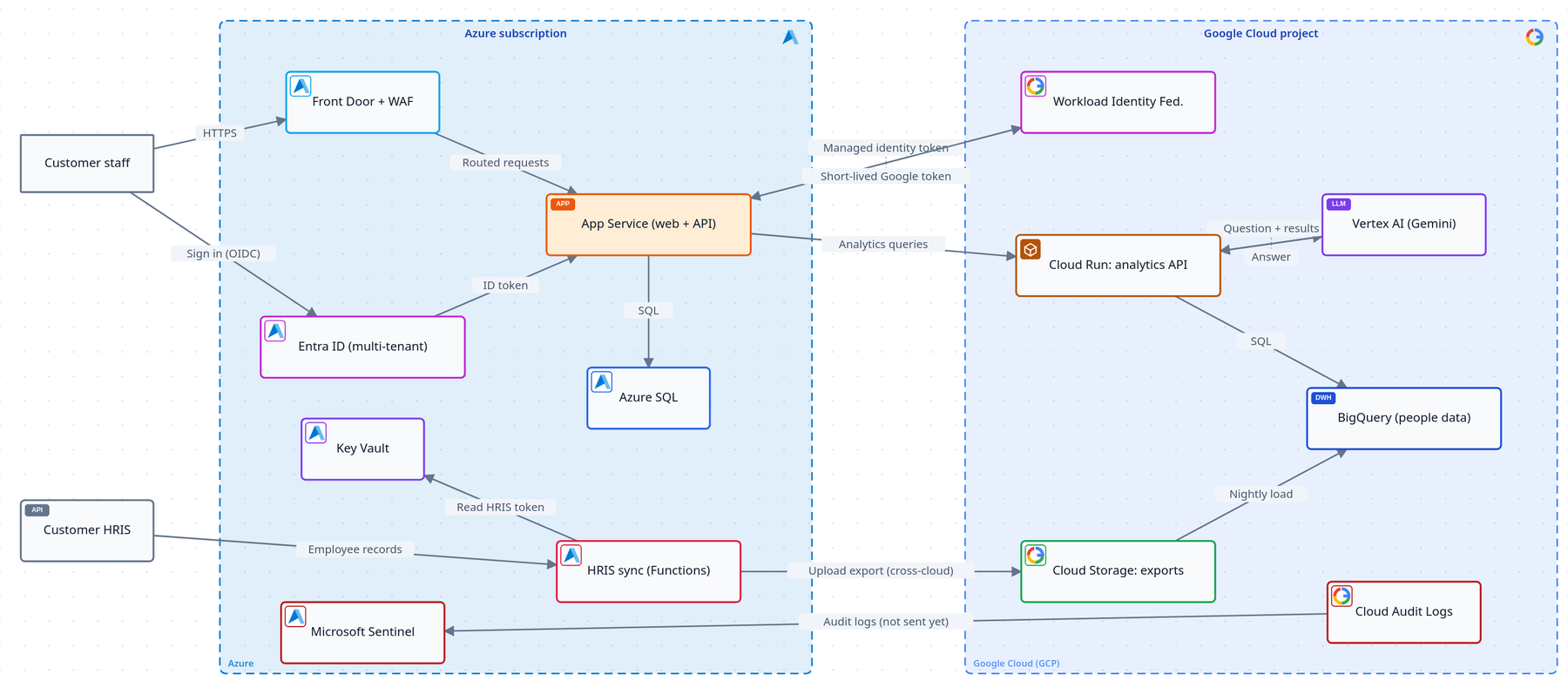
A multi-tenant HR analytics app split across two clouds: the app and Microsoft Entra ID sign-in on Azure, because its customers run Microsoft 365, and the data platform and Gemini on Google Cloud, joined by workload identity federation instead of stored keys.

  • Front Door + WAF
  • App Service
  • Entra ID (multi-tenant)
  • Key Vault
  • Workload Identity Federation
  • Cloud Run
  • BigQuery
  • Vertex AI
Data flow diagram of Teamscope: customer staff and the customer HRIS outside; an Azure subscription with Front Door, App Service, Entra ID, Azure SQL, Key Vault, the HRIS sync function and Sentinel; a Google Cloud project with workload identity federation, Cloud Run, Cloud Storage, BigQuery, Vertex AI and Cloud Audit Logs.
The Teamscope data flow diagram, as it opens in ThreatTree.

Key risks in the model

ThreatScoreFirst fix
AI answers beyond the user's access16 CriticalRow-level security before any data reaches the prompt
A static Google service-account key leaks15 HighFederation only; block key creation by policy
Any Microsoft tenant can sign in15 HighAllow-list each customer's tenant ID
Accounts matched by email (nOAuth)10 HighKey accounts on object ID plus tenant ID

1 data flow diagram · 2 attack trees · 10 scored risks (1 critical), each with a treatment and an owner

Which one should you start from?

If your app…Start from
is a framework app on a managed cloud, with a database and paymentsInvoicely
runs on one hosting plan or VPS, with cPanel/hPanel and an AI APIQuillpad
is multi-tenant on AWS, or uses RAG over customer documents on any cloudLexibase
spans two clouds, signs in with Microsoft Entra ID, or analyses personal data with AITeamscope
  1. Open the closest example

    It opens as a draft with the diagram, both attack trees and the risk register already filled in.

  2. Make the diagram match your app

    Rename components, delete what you don't run, and add what's missing. The attack tree generator can draft trees for anything new.

  3. Rescore and assign owners

    Adjust likelihood and impact for your context, give each risk a real owner, and save it to your forests.

FAQ

SaaS threat model examples, answered

What founders ask before opening one.

Are these threat model examples really free?

Yes. All four open on every plan, Free included. Each one opens as a draft that is not added to your forests, and does not count towards the Free plan's 3 forests, until you choose to save it.

Can I edit an example to match my own app?

Yes, that is what they are for. Rename and delete components, add your own, rescore the risks and assign real owners. Opening the same example again takes you back to your copy rather than starting over.

Which frameworks do the examples use?

Every risk is tagged with STRIDE and, where it fits, OWASP Top 10, the OWASP Top 10 for LLM Applications (2025), LINDDUN or CAPEC, with MITRE ATT&CK and MITRE ATLAS technique IDs. All of these are available on the Free plan.

Is an example a substitute for threat modeling my own system?

No. It gives you a realistic starting point and shows what a finished model looks like, but your app has its own data, integrations and decisions. Use it to get to a first version of your own model quickly, then keep it up to date as the system changes.

My stack is different. Which one should I pick?

Pick the one whose hosting is closest to yours, then add or remove components. Running containers on Google Cloud with OpenAI? Start from Lexibase and swap the AWS services. On a single VPS with no AI? Start from Quillpad and delete the OpenAI parts.

Do the examples include AI threats?

Three of the four do: prompt injection, denial of wallet (a runaway model bill), retrieval leaking another tenant's documents, AI output rendered as HTML, and AI answers revealing data beyond the user's access. Each maps to the OWASP Top 10 for LLM Applications.

Your app's threat model, from a finished example.

Free plan, no credit card. Open the example closest to your stack, or start a blank model.