If you're building anything on top of a large language model, sooner or later someone asks whether you've "covered the OWASP LLM Top 10". It's become the shared vocabulary for LLM risk: security reviews quote it, pentest reports tag findings with it, and procurement questionnaires ask about it by number.
This post explains the list as it stands today, the 2025 edition, item by item. Rather than abstract definitions, each item gets one concrete threat on the same system: Lexibase, a fictional B2B document assistant on AWS where teams upload documents and ask questions answered by Amazon Bedrock. It's a retrieval-augmented generation (RAG) application, the most common shape of LLM product, and it's one of the free example models in ThreatTree, so you can open it and follow along.
The short version: the OWASP Top 10 for LLM Applications is a ranked list of the ten most critical security risks in applications built on large language models, published by the OWASP GenAI Security Project. The current edition, released on 18 November 2024, is the 2025 list: LLM01 Prompt Injection, LLM02 Sensitive Information Disclosure, LLM03 Supply Chain, LLM04 Data and Model Poisoning, LLM05 Improper Output Handling, LLM06 Excessive Agency, LLM07 System Prompt Leakage, LLM08 Vector and Embedding Weaknesses, LLM09 Misinformation and LLM10 Unbounded Consumption. It's an awareness list, not a standard. Use it in a threat model as a checklist of what to look for at each part of your LLM pipeline, and as tags on the threats you find, not as the threat model itself.
What the list is, and where it came from
OWASP is best known for the OWASP Top 10 for web applications. In 2023, as teams rushed LLM features into production, a separate OWASP project published a Top 10 for LLM Applications, because the web list had no words for problems like a model obeying instructions hidden in a document. The project has since grown into the OWASP GenAI Security Project, which also publishes guidance on agentic AI, red teaming and AI security governance.
The 2025 edition was a substantial rewrite, based on what had gone wrong in real deployments since the first version. Two items are new, System Prompt Leakage and Vector and Embedding Weaknesses, the second largely because of how widely RAG is now used. Sensitive Information Disclosure moved up from sixth to second. Excessive Agency was expanded for agents that take actions. Overreliance became Misinformation, and Model Denial of Service was broadened into Unbounded Consumption, which also covers runaway costs and model extraction. As of 5 November 2026, the 2025 list is still the current edition.
The ten at a glance
| ID | Risk | In one line | Lexibase example |
|---|---|---|---|
| LLM01 | Prompt Injection | Text the model reads changes what it does | An uploaded document tells the model to leak other files |
| LLM02 | Sensitive Information Disclosure | The model or its plumbing exposes data it shouldn't | Full prompts, with customers' documents, sit in invocation logs |
| LLM03 | Supply Chain | Models, packages and data you didn't build can be compromised | A poisoned document-parsing package in the ingest worker |
| LLM04 | Data and Model Poisoning | Tampered training or source data changes behaviour | False "policy" documents planted where they'll be indexed |
| LLM05 | Improper Output Handling | Model output is trusted by whatever renders or runs it | A Markdown image in the answer sends data to an attacker |
| LLM06 | Excessive Agency | The model can do more than the task needs | An assistant that can email any document to anyone |
| LLM07 | System Prompt Leakage | Secrets or rules in the system prompt get revealed | The system prompt holds an internal API key |
| LLM08 | Vector and Embedding Weaknesses | Retrieval and the vector store leak or get poisoned | Retrieval skips the tenant filter in a shared index |
| LLM09 | Misinformation | Confident, wrong answers that people act on | An answer cites a contract clause that doesn't exist |
| LLM10 | Unbounded Consumption | Nothing limits tokens, cost or extraction | Scripted trial accounts run up the Bedrock bill |
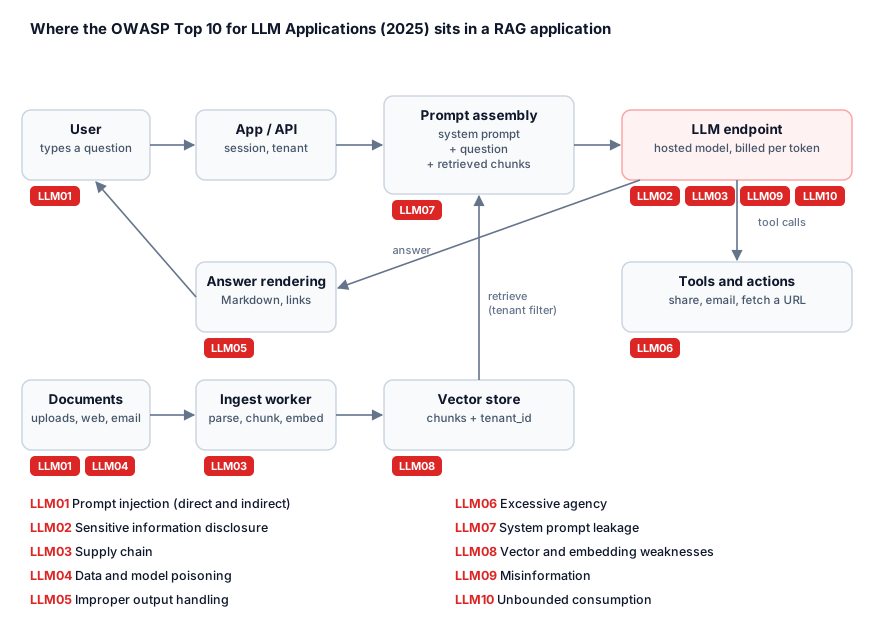
The ten risks, one by one
LLM01: Prompt Injection
Prompt injection is any input that changes the model's behaviour in a way you didn't intend. Direct injection is the user typing it. Indirect injection is hidden in content the model reads: a web page, an email, a document. It's first on the list because there's still no reliable way to stop a model following instructions in its input, so you design around it instead. Our knowledge base entry on prompt injection covers how it works and which defences hold up.
In Lexibase: a counterparty sends a contract with instructions hidden in white text. A customer uploads it, and whenever it's retrieved, those instructions ride into the model's context next to the user's question. In the example model this is the leaf "Poisoned document exfiltrates", scored likelihood 3 × impact 4 = 12. First controls: limit what a compromised answer can reach (retrieval scoped to the user, see LLM08), and remove the ways out (see LLM05).
LLM02: Sensitive Information Disclosure
This covers personal data, credentials, business secrets and other customers' data leaking through the model's answers, or through everything around it: logs, traces, caches, fine-tuning sets and providers that retain prompts. The model is rarely the only place the data ends up.
In Lexibase: to debug answer quality, someone enables model invocation logging. Every prompt, including retrieved chunks of customers' contracts, is now stored in a log bucket that a broad engineering role can read. First controls: treat prompts and completions as data with the classification of the most sensitive thing they can contain, keep logging opt-in and short-lived, and check what each model provider retains and for how long.
LLM03: Supply Chain
LLM applications depend on more third parties than most software: hosted model APIs, open-weight models from public hubs, fine-tuning adapters, datasets, and the libraries that parse documents and call models. Any of them can be compromised, swapped or quietly changed. Model files in formats that execute code on load, such as Python pickles, are a classic route. The supply chain threat modeling guide covers the general case; for models, an SBOM extended to models and datasets (an ML-BOM) is the inventory to start from.
In Lexibase: the ingest worker uses an open-source PDF parsing package. A malicious version, or a look-alike package an AI coding assistant suggested, runs with the worker's permissions on every customer's uploads. First controls: pinned and verified dependencies, safe model formats such as safetensors, and an inventory of which models and versions run where, so a provider's model change is a reviewed event rather than a surprise.
LLM04: Data and Model Poisoning
Poisoning is tampering with the data a model learns from or relies on: pre-training data, fine-tuning sets, or the documents behind retrieval. It can plant false facts, biases or a hidden backdoor that only a specific trigger phrase activates. If you train or fine-tune, data provenance is the control that matters most.
In Lexibase: Lexibase doesn't train a model, which is common, so poisoning reaches it through what it indexes. A contractor with access to a shared folder adds a convincing "Updated refund policy" document, and Lexibase now cites it to staff as fact. First controls: know which sources are indexed and who can write to them, show the source of every answer, and give authoritative documents more weight than everything else.
LLM05: Improper Output Handling
Model output is untrusted input to whatever consumes it. When an application renders it as HTML or Markdown, runs it as SQL or code, or passes it to a shell or another system without validation, you get the classic web bugs: cross-site scripting, injection, server-side request forgery. Prompt injection often supplies the payload; improper output handling is what makes it land.
In Lexibase: answers are rendered as Markdown. An injected instruction makes the model add an image whose URL contains the text it just summarised, and the user's browser sends that data to the attacker's server the moment the answer appears. The example model tags this leaf with both LLM01 and LLM05. First controls: no images or raw HTML in answers, and no links except citations the application builds itself.
LLM06: Excessive Agency
Excessive agency is giving the model more functionality, more permissions or more autonomy than the task needs, so a manipulated or simply mistaken model can do real damage. It grows with every tool you connect, which is why it matters most for agents and MCP servers. Our guide to threat modeling AI agents goes deeper.
In Lexibase: the roadmap adds an assistant that can "share this document with a colleague". Built carelessly, the tool can email any document to any address, so the poisoned contract from LLM01 can now send files outside the company. First controls: tools that act with the user's permissions, not the service's, recipients limited to the user's own organisation, and a confirmation step for anything with side effects.
LLM07: System Prompt Leakage
System prompts get revealed, through direct requests, injection or error messages, so anything sensitive in one should be assumed public. The real risk isn't the prompt text itself; it's what teams put in it: credentials, internal URLs, tenant lists, or security rules that only the prompt enforces.
In Lexibase: an early version put an internal search API key and the instruction "never reveal documents from other tenants" in the system prompt. Both are wrong. The key belongs in a secrets manager, called by code. The tenant rule belongs in the retrieval query, where the model can't talk its way past it. First control: write the system prompt as if every user will read it.
LLM08: Vector and Embedding Weaknesses
RAG adds a new data store and a new access decision on every question. Weaknesses include retrieval that ignores permissions, a shared index where one tenant's chunks can be returned to another, poisoned embeddings, and embeddings treated as anonymous when they can be inverted back to approximate text. Our worked example on threat modeling a RAG application covers this item in depth.
In Lexibase: all tenants share one OpenSearch index, and every chunk carries a tenant_id that retrieval must filter on. One code path forgets the filter, and a customer gets answers built from another customer's contracts. It's the highest-scoring threat in the example model: likelihood 4 × impact 5 = 20. First controls: build the filter from the authenticated session, never from the prompt, and test it with two tenants on every release.
LLM09: Misinformation
Models produce fluent, confident answers that can be wrong, including citations, numbers and code that don't exist. It becomes a security and liability problem when people or systems act on them. In February 2024, a Canadian tribunal held Air Canada responsible for a refund policy its website chatbot had invented, rejecting the argument that the chatbot was responsible for its own words.
In Lexibase: asked about a notice period, the model answers "90 days, see clause 14.2". The contract says 30, and has no clause 14.2. First controls: answers only from retrieved text, citations checked against the source, an explicit "I couldn't find that" path, and evaluation sets that measure how often answers are wrong.
LLM10: Unbounded Consumption
Every LLM request costs compute and money. Without limits, attackers can exhaust capacity (denial of service), run up your bill (denial of wallet) or query a model enough to copy its behaviour (model extraction). Stolen cloud credentials used to run models on someone else's account have become common enough to have a name: LLMjacking.
In Lexibase: scripted trial tenants ask long questions in a loop, or leaked AWS keys invoke Bedrock directly, and nothing caps tokens per tenant or alerts on spend. The example model scores it 3 × 3 = 9. First controls: per-tenant token and rate limits, a maximum context size, spend alerts, and model access granted only to the roles that need it.
How to use the list in a threat model
The Top 10 tells you what to look for. It doesn't tell you where those problems are in your system, how likely they are or what to do first. That's the threat model's job, and the two fit together well:
- Draw the pipeline. A data flow diagram with the model endpoint, prompt assembly, retrieval, vector store, tools and output rendering as separate elements, and a trust boundary around everything outside your control, including the model provider.
- Walk the list per element. Use the diagram above as a guide to which items apply where. STRIDE still covers the conventional parts: the API, the database, the cloud account.
- Build attack trees for outcomes, not for items. Real attacks combine items. Lexibase's worst data leak needs LLM01 to get the instruction in and LLM05 to get the data out, which is exactly what an attack tree with an AND gate shows.
- Tag each leaf with its item. Tags let you answer "what have we done about LLM08?" in seconds, and let a reviewer see coverage across the whole model.
- Check coverage both ways. For every item with no threat against it, write down why: "LLM04: we don't train, and indexed sources are limited to the customer's own uploads" is an answer a reviewer can check. A blank isn't.
LLM Top 10 vs. the OWASP Top 10 vs. MITRE ATLAS
| List | What it covers | Use it for |
|---|---|---|
| OWASP Top 10 for LLM Applications | Risks specific to applications built on LLMs | Checking an LLM feature and tagging its threats |
| OWASP Top 10 | The most critical web application risks | The web and API parts of the same application |
| MITRE ATLAS | A knowledge base of real attacker tactics and techniques against AI systems | Describing attack steps precisely, the way MITRE ATT&CK does for enterprise IT |
You'll usually need more than one. Lexibase's API is still exposed to broken access control from the web list, and an attack-tree leaf can carry both an LLM Top 10 item and an ATLAS technique ID. Note too that the LLM Top 10 is about attacks on LLM applications. Attackers using AI against ordinary systems, such as voice-cloned helpdesk calls, are a different problem, covered in our guide to threat modeling AI-assisted attackers.
What the list can't do
- It isn't a standard you comply with. There are no requirements, no levels and no certification. "OWASP LLM Top 10 compliant" doesn't mean anything specific.
- It doesn't rank your risks. The order reflects how often and how badly each problem shows up across many applications, not in yours. In Lexibase, LLM08 scores highest and LLM07 is easy to fix.
- Its items overlap. One attack often spans two or three items, so counting "items covered" says little. Count outcomes you've reduced.
- It doesn't cover the rest of the system. The cloud account, the identity provider and the CI pipeline behind an LLM feature need their own threat model, and in Lexibase they hold some of the highest-scoring risks.
Frequently asked questions
What is the OWASP Top 10 for LLM Applications?
It's a list of the ten most critical security risks in applications built on large language models, published by the OWASP GenAI Security Project. The current edition is the 2025 list, released in November 2024. It covers prompt injection, sensitive information disclosure, supply chain, data and model poisoning, improper output handling, excessive agency, system prompt leakage, vector and embedding weaknesses, misinformation and unbounded consumption.
What is the number one risk in the OWASP Top 10 for LLMs?
Prompt injection, LLM01, in both the 2023 and 2025 editions. It's first because a model can't reliably tell instructions from data, so any text it reads, whether typed by a user or hidden in a document or web page, can change what it does. There's no complete fix yet, so applications are designed to limit what a manipulated model can reach and do.
What changed in the 2025 version of the OWASP LLM Top 10?
Two items are new: System Prompt Leakage (LLM07) and Vector and Embedding Weaknesses (LLM08). Sensitive Information Disclosure moved up to second place, Excessive Agency was expanded for agents, Overreliance was replaced by Misinformation, and Model Denial of Service was broadened into Unbounded Consumption, which also covers runaway costs and model extraction.
How is the LLM Top 10 different from the OWASP Top 10?
The OWASP Top 10 covers web application risks such as broken access control and injection. The LLM Top 10 covers risks that only exist when an application uses a language model, such as prompt injection and excessive agency. An LLM application needs both, because it's usually a web application with a model inside it.
Is there a 2026 version of the OWASP Top 10 for LLM Applications?
As of 5 November 2026, the most recent edition is the 2025 list, published in November 2024. Check the OWASP GenAI Security Project site for updates. For applications where models take actions through tools, OWASP also publishes separate guidance on agentic AI threats, which complements the LLM list rather than replacing it.