Retrieval-augmented generation (RAG) is the usual way to make a language model answer from your own data. You split documents into chunks, store an embedding of each chunk in a vector store, and at question time you fetch the closest chunks and put them in the prompt. It's often described as a search problem. In a threat model it's two other things: an authorisation decision, made every time the retriever picks chunks, and a pipeline that copies other people's text into your model's instructions.
This post threat models one RAG feature from start to finish. The example is Supportly, a fictional multi-tenant help desk. Its AI feature drafts replies for support staff from the customer's past tickets, help-centre articles and connected Google Drive and Confluence spaces. We draw the data flow diagram from ingestion to the rendered answer, run STRIDE over each stage, build the attack tree and finish with a scored risk register. Our AI agents guide covers how LLM systems change threat modeling in general. This one goes deeper on retrieval.
The short version: treat retrieval as an authorisation check and the rendered answer as an output channel. Enforce tenant and document permissions in the vector query itself, built from the user's session, never from the prompt or the model. Re-check permissions against the source for the chunks you're about to use, because the copy in your index goes stale. Assume any indexed text written by outsiders, such as emailed tickets, shared documents or web pages, can carry instructions. Then make sure the answer can't carry data anywhere: no images, no raw HTML and no links except citations your application builds itself. Finally, the vector store is a copy of your customers' data, not an anonymised index. Classify it, encrypt it and make deletions reach it.
What a RAG application is, in threat model terms
A RAG feature has two pipelines that share a store. Ingestion runs in the background: it fetches documents, parses them, splits them into chunks, sends the chunks to an embedding model and writes chunks, vectors and metadata to the vector store. Answering runs per question: it embeds the question, searches the store for the closest chunks, puts them in a prompt with the question and the system instructions, calls the model and shows the answer.
Mapped onto a data flow diagram, that gives:
| RAG part | On the DFD | Who controls the content |
|---|---|---|
| Sources | External entities or data stores | Whoever can write to them: staff, customers, anyone who can send an email or edit a shared doc |
| Ingestion worker | Process | You, but its input is the sources above |
| Embedding model | External entity, or a process if you host it | The provider |
| Vector store | Data store holding chunks, vectors and metadata | You, filled with your sources' content |
| Retriever and prompt builder | Process | You. This is where permissions are enforced or not. |
| LLM | External entity | The model provider |
| Answer renderer | Process in the user's browser | You, given text the model wrote |
What has gone wrong so far
Two public incidents and two research results show the pattern. Dates are when each was disclosed or published.
- Slack AI (August 2024). An attacker posted instructions in a public channel that only they had joined. When a victim asked Slack AI for an API key kept in a private channel, retrieval pulled in both the key and the attacker's message. The answer showed a "click here to reauthenticate" link with the key in its URL. The citation pointed only at the victim's own message, so nothing showed where the instruction came from. PromptArmor
- EchoLeak, CVE-2025-32711 (June 2025). One crafted email sent to a user could make Microsoft 365 Copilot send data from that user's context to an attacker, without the user clicking anything. Copilot retrieved the email later, when the user asked a question it seemed relevant to. The instructions got past Microsoft's prompt-injection classifier, used reference-style markdown to avoid link redaction, and had Copilot add an image that the browser fetched automatically, through a Microsoft Teams URL the content security policy allowed. Microsoft fixed it on the server side. It was scored 9.3. Case study (arXiv)
- PoisonedRAG (2024). Researchers added five crafted texts per target question to a knowledge base of millions of texts and got the answer they wanted 90% of the time. A handful of documents is enough. Zou et al., USENIX Security 2025
- Embedding inversion (2023). A method that repeatedly guesses and re-embeds text recovered 92% of 32-token inputs exactly from their embeddings, and recovered full names from clinical notes. Vectors are not anonymised data. Morris et al.
Neither incident needed a bug in the retrieval code. Both systems retrieved exactly what they were built to retrieve. The problem was what the text could make the model write, and what the interface did with what the model wrote.
Step 1: Draw the data flow diagram
Supportly is a help desk that many companies use for customer support. Each company is a tenant. Its end customers email in, and their emails become tickets. The company's support staff answer them. The AI feature, which we'll call Ask, sits next to each ticket and drafts a reply from three sources: the tenant's past tickets, its help-centre articles and any Google Drive or Confluence spaces the tenant connects. Ask has no tools. It can't send email or change anything. A person reads every draft before it goes out.
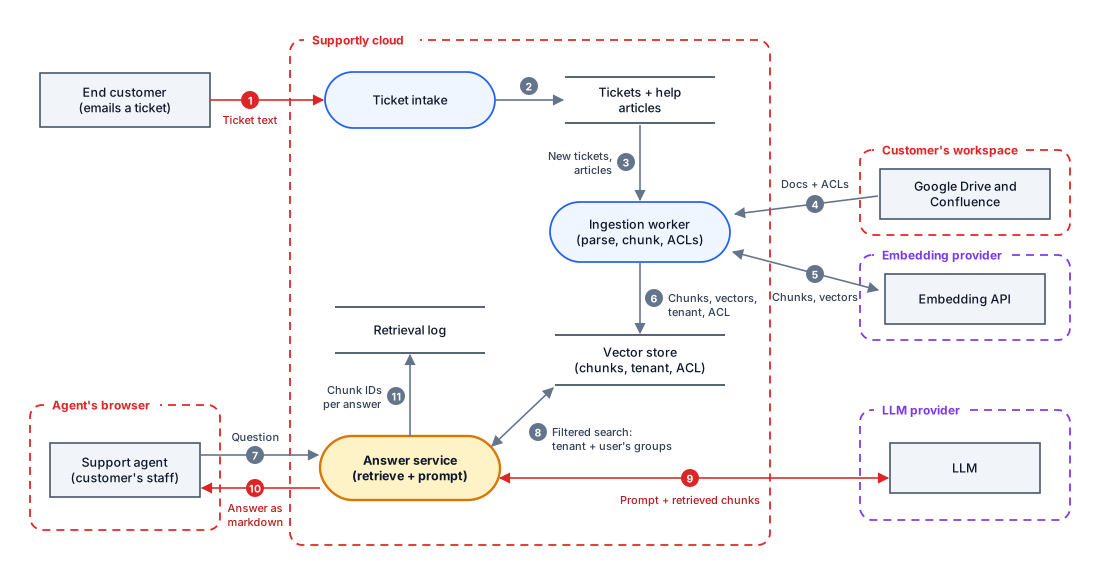
Most diagrams of RAG stop at flows 7, 8 and 9. Follow flow 1 instead. An end customer, who could be anyone with an email address, writes a ticket. Supportly stores it, the ingestion worker chunks and embeds it, and from then on it can be retrieved into any prompt for that tenant. Ask has no tools, so it might look like it has no way to send data out. Flow 10 is the way out: the answer is markdown, and a browser that renders markdown will load images and follow links.
Step 2: The four boundaries people miss
A trust boundary is anywhere data or control passes between parties that trust each other differently. A RAG application has four that a quick review usually skips.
1. Ingestion is a write path into the prompt. Anyone who can put text into an indexed source can put text into a future prompt. For Supportly that's every end customer who emails in and every person with edit access to a connected Drive folder. That's indirect prompt injection, and the boundary sits at the source, not at the chat box. Mark each source on the diagram by who can write to it.
2. Retrieval is an authorisation decision. A similarity search returns whatever is closest to the question. If the index holds documents the user can't read, the answer can be built from them. The check has to be in the query: a filter on tenant and on the users and groups allowed to read each chunk, built from the authenticated session. A line in the system prompt saying "only use documents this user can see" isn't a control. Neither is a filter whose values come from the request or the model. This is the IDOR of RAG.
3. The vector store is a copy of your data. Each record holds the chunk text, its vector and metadata. Permissions copied from Drive at indexing time are a snapshot, and they're wrong as soon as someone removes a share. Deleting a ticket in the database doesn't delete its chunks. And embeddings can be turned back into much of the original text. The store needs the same classification as the most sensitive document in it.
4. The rendered answer is an output channel. If the answer can contain an image, the browser fetches its URL as soon as it renders, and anything in that URL goes to whoever runs the server. If it can contain a link, one click does the same. A RAG feature without tools still has a way to send data out, and it's the renderer.
Simon Willison's lethal trifecta applies here too: private data, untrusted content and a way to send data out, in one system. Supportly's Ask has all three by design. Tickets and Drive documents are the private data, emailed tickets are the untrusted content, and the markdown renderer is the way out. Of the three, the renderer is the one Supportly can remove.
Step 3: STRIDE over each stage
Run STRIDE over each stage of the pipeline, then tag each threat with its item from the OWASP Top 10 for LLM Applications 2025. LLM08, Vector and Embedding Weaknesses, was new in that edition, largely because of how widely RAG is now used.
| Stage | STRIDE | Threat to Supportly's Ask | OWASP LLM |
|---|---|---|---|
| Ingestion | Tampering | An end customer emails a ticket containing instructions, and it's indexed with the same standing as a help article. | LLM01, LLM04 |
| Ingestion | Denial of service | A malicious attachment exploits the document parser, or a huge file stalls the ingestion queue for every tenant. | LLM10 |
| Ingestion | Info disclosure | Drive permissions aren't copied with the document, or are copied once and never updated. | LLM08 |
| Vector store | Info disclosure | Vectors are treated as anonymous, exported or backed up loosely, and inverted to recover text. | LLM08 |
| Vector store | Info disclosure | A ticket deleted under a GDPR request is still retrievable from its chunks. | LLM02 |
| Retrieval | Elevation | The search filter takes its tenant or group values from the request or the model, so a crafted question widens it. | LLM08 |
| Retrieval | Info disclosure | The search runs over the whole index, or the whole tenant, without the user's document permissions. | LLM08 |
| Generation | Tampering | The model follows instructions found in a retrieved chunk. | LLM01 |
| Generation | Info disclosure | The model repeats the system prompt, or chunks the agent didn't need, into the draft. | LLM02, LLM07 |
| Generation | Denial of service | Unbounded questions per tenant run up the model bill until a limit stops the feature for everyone. | LLM10 |
| Rendering | Info disclosure | A markdown image or link in the answer carries data to an attacker's URL. | LLM05 |
| Logging | Repudiation | Nobody can tell which chunks produced a harmful or wrong answer, so the poisoned source can't be found. | LLM09 |
Supportly also runs a public chatbot on each tenant's help centre, which should only ever see published articles. The same retrieval threat applies, with the internet as the user. The fix is the same: the bot's queries go to a separate index of published articles, not to the full index with a filter the prompt is trusted to apply.
Step 4: An attack tree for the outcome that matters
The worst realistic outcome is a tenant's data reaching someone who isn't allowed to see it. The attack tree has two very different routes there. One needs an attacker and three steps. The other needs nobody at all, just a filter that's missing or out of date. Leaves are scored likelihood × impact on a 5×5 risk matrix, where 10 to 15 is High and 16 to 25 is Critical.
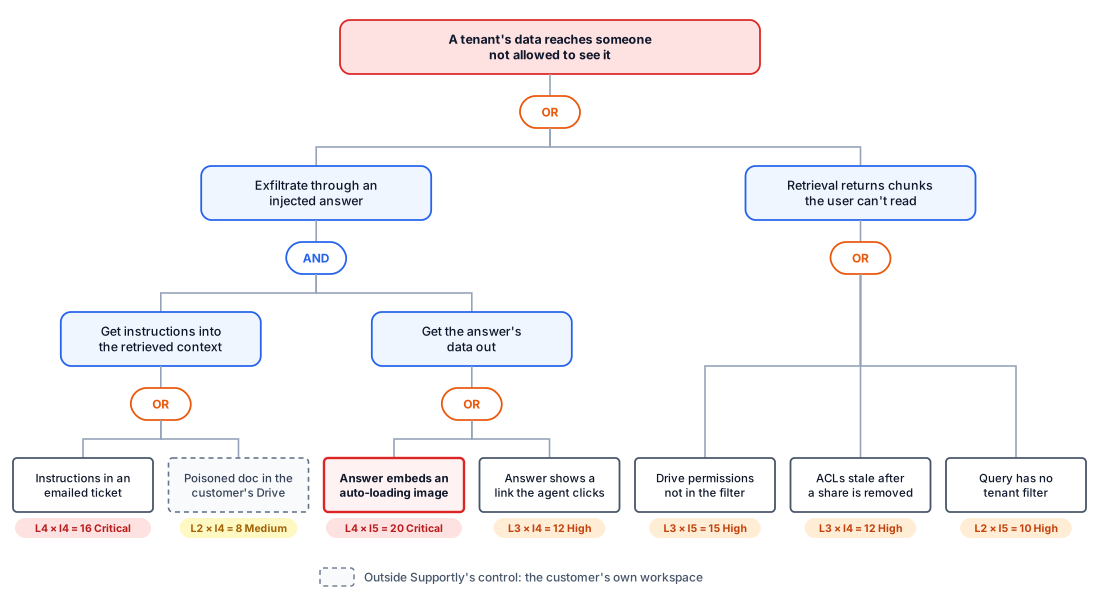
Start with the left branch. Supportly can't close "get instructions in". Any end customer can email a ticket, and no filter reliably spots instructions in text. But the branch is an AND gate, so Supportly doesn't have to. If the answer can't load images and can only link to sources Supportly picked itself, a successful injection has nowhere to send data. That's why the image leaf is highlighted: it's the highest score in the tree, and it's the one that removes a whole branch when fixed. EchoLeak got round a classifier, link redaction and a content security policy. It wouldn't have got round an answer that can't contain an image at all.
The right branch is the quieter one. No attacker needs to do anything. A sales lead asks Ask about a customer, and the draft quotes a board document from a Drive folder they were removed from last week. Nothing is logged as an incident, because nothing looked wrong. That's the kind of risk a threat model finds and a penetration test usually doesn't.
Step 5: Score it and build the register
Here's the risk register for Ask, with each threat scored, treated and owned.
| # | Threat | L × I | Treatment | Owner |
|---|---|---|---|---|
| R1 | Answer carries data out in an image or link | 4 × 5 = 20 | Mitigate: render a small markdown subset with no images and no raw HTML. Links in the draft come only from the retrieval metadata, as citations the app builds. Any other URL the model writes is shown as plain text. A content security policy limits image and connection sources to Supportly's own origin, with no proxy endpoint that fetches arbitrary URLs. | Frontend lead |
| R2 | Instructions in emailed tickets | 4 × 4 = 16 | Mitigate partly: ticket chunks go in the prompt inside their own labelled block, marked as written by an end customer. The public help-centre bot never retrieves tickets. Every draft is reviewed by a person and Ask has no tools. Accept the residual risk, because R1 removes the way out. Review whenever Ask gains a tool. | Product lead |
| R3 | Drive and Confluence permissions not in the filter | 3 × 5 = 15 | Mitigate: store the users and groups allowed to read each chunk, and filter on them in the vector query using the identity from the session. Before building the prompt, re-check the top results against the source's permissions API and drop any the user can't open. | Search team |
| R4 | Copied permissions go stale | 3 × 4 = 12 | Mitigate: update on change notifications from Drive and Confluence, with a full reconciliation every 24 hours. The live re-check in R3 covers the gap between them. Accept a residual window of minutes. | Search team |
| R5 | Deleted sources stay in the index | 3 × 4 = 12 | Mitigate: every chunk stores its source ID, and deleting a ticket, article or document deletes its chunks in the same job. A nightly job removes chunks whose source is gone. Vector store backups expire after 35 days. This is part of answering an erasure request under GDPR. | Data protection lead |
| R6 | Search not scoped to the tenant or audience | 2 × 5 = 10 | Mitigate: the retrieval layer adds the tenant filter from the session, and the model never chooses filters. Each tenant has its own namespace. The public bot uses a separate index of published articles only. Tests run every query path as another tenant. | Search team |
| R7 | Vector store treated as non-sensitive | 2 × 5 = 10 | Mitigate: classify the store like the tickets themselves, encrypt it, offer no bulk export, and log access. The embedding provider is under a data processing agreement with no retention of inputs. | Platform |
| R8 | No record of which chunks produced an answer | 3 × 3 = 9 | Mitigate: log the chunk IDs, source IDs, scores and filters for every answer. Citations shown to the agent come from this log, not from the model's text, so every source that shaped an answer is visible. | Engineering lead |
| R9 | Poisoned article or shared document | 2 × 4 = 8 | Accept with monitoring: articles are written by the tenant's own staff, and Drive is the tenant's to manage. R8's citations let an agent see which source a strange draft came from, and the source can then be removed from the index. | Product lead |
R2 is the honest row. It says out loud that part of the risk stays, and it names what makes that acceptable: R1 removes the way out, and a person reads every draft. Those are compensating controls, and they only hold while Ask has no tools and the renderer stays strict. Record both as triggers in R2's notes. Adding a "send reply" button, or letting the draft include images, are standard reasons to re-threat model.
R8 fixes the detail that made the Slack AI attack hard to spot. There, the citation pointed only at the victim's own message, so nothing showed that the attacker's message had been retrieved too. If citations come from the retrieval log instead of the model, every chunk that shaped the answer is listed, including the one with the instructions.
What threat modeling can't do here
- It can't make retrieval injection-proof. No classifier, delimiter or system prompt reliably stops instructions in retrieved text as of October 2026. EchoLeak got past a production classifier. The model assumes injection will sometimes succeed and limits what it can achieve.
- It can't make answers correct. A model can misread a correct source, or blend two chunks into something neither says. Citations and human review reduce the harm. They don't remove it.
- It can't fix permissions that were wrong at the source. If a board document is shared with the whole company, permission-aware retrieval will dutifully show it to the whole company. RAG doesn't create oversharing. It makes oversharing much easier to find.
- It can't stay current by itself. A new source, a new embedding model, a reranker or a first tool all change the diagram. Re-check the model when any of them ships.
A checklist for your RAG application
- Draw both pipelines, ingestion and answering, with every source, the embedding model, the vector store, the LLM and the renderer.
- Label every source by who can write to it, and mark sources written by outsiders as untrusted input to the model.
- Store tenant and reader permissions on every chunk, and filter on them in the vector query using the identity from the session.
- Re-check the top results against the source's permissions before building the prompt.
- Keep public-facing features on a separate index that only holds public content.
- Render answers without images or raw HTML, and only link to citations your app builds from retrieval metadata.
- Make deleting a source delete its chunks, reconcile the index regularly, and set an expiry on backups.
- Classify and protect the vector store like the most sensitive document in it.
- Log which chunks, scores and filters produced each answer.
- Write down the controls that make your accepted risks acceptable, and the changes that would reopen them.
Sources, as of 31 October 2026: the OWASP LLM08:2025 Vector and Embedding Weaknesses entry and the wider Top 10 for LLM Applications 2025, plus the incident write-ups and papers linked above.
Frequently asked questions
What is the biggest security risk in a RAG application?
Two risks top most RAG threat models. The first is retrieval that ignores who is asking, so a user gets answers built from documents they couldn't open themselves. The second is text in an indexed document that steers the model, combined with an answer format that can carry data out, such as a markdown image or link. The first needs no attacker at all. The second needs nothing more than the ability to put text somewhere your pipeline indexes.
Can a RAG application leak data between users?
Yes, if the similarity search runs over more than the user is allowed to read. A vector store returns whatever is closest to the question, so the permission check has to be part of the query: a filter on tenant and on the users and groups allowed to read each chunk, built from the user's session rather than from anything the model or the request says. Permissions copied at indexing time also go stale, so re-check them against the source for the chunks you're about to use.
Are vector embeddings sensitive data?
Treat them as sensitive as the text they came from. Research published in 2023 recovered 92% of 32-token inputs exactly from their embeddings, and recovered full names from clinical notes. A vector store also usually keeps the chunk text next to each vector. Give it the same classification, encryption, access control and deletion process as the source documents.
How do you prevent prompt injection in a RAG application?
You can't prevent it reliably, so limit what it can do. Label text written by outsiders as such in the prompt, keep it out of features that don't need it, and don't let the answer carry data anywhere: no images, no raw HTML and no links except citations your application builds from retrieval metadata. Keep a person between the answer and any action, and log which chunks produced each answer so a poisoned one can be found and removed.
How do you delete personal data from a RAG system?
Store the source document ID on every chunk, and make deleting a source delete all of its chunks and vectors in the same job. Run a regular reconciliation that removes any chunk whose source no longer exists, set an expiry on vector store backups, and check that your embedding and model providers don't keep what you send them. Then a deletion request covers the index as well as the database.