The Model Context Protocol (MCP) has become the usual way to connect an AI assistant to other software. A SaaS product ships an MCP server, a customer connects it to their assistant, and the assistant can then search, create and send things in that product on the customer's behalf. Your threat modeling method stays the same. What changes is where the trust boundaries sit, and three of them are easy to miss: text your server returns becomes instructions to someone else's model, your server acts on users' behalf with real credentials, and a server someone installs is code they run.
This post threat models one MCP server from start to finish. The example is Invoicely, the small invoicing app from our threat model example, which now offers an MCP server so customers' assistants can work with their invoices. We draw the data flow diagram, run STRIDE against what the MCP specification requires, build the attack tree for the outcome that matters and finish with a scored risk register. The last part covers the other side: the MCP servers your own teams install.
The short version: assume the agent calling your tools has been hijacked, because sometimes it will have been. Tool descriptions and tool results go into the model's context, so draw the context window as a trust boundary and treat any text from users or third parties that your tools return as a possible prompt injection. Then design each tool so a hijacked agent can't do much with it. That means no free-text recipients or URLs on tools that send data out, small read results, narrow OAuth scopes with step-up for writes, and token audience checked on every request. Watch for the combination Simon Willison calls the lethal trifecta: private data, untrusted content and a way to send data out, all available to one agent. A single MCP server can supply all three. Finally, treat each server your teams install as third-party code running with their privileges.
What an MCP server is, in threat model terms
MCP has three parts. The host is the AI application the user works in, such as a chat app, an IDE or an agent. Inside it, a client holds the connection to each server. A server exposes tools (actions the model can call), resources (data the host can read) and prompts (templates). Servers run either as a local process the host starts and talks to over stdio, or as a remote service over Streamable HTTP.
As of 25 October 2026 the current specification revision is 2026-07-28. It made the protocol stateless: there's no initialise handshake and no protocol-level session any more, so a server that needs state across calls passes an explicit handle back and forth as a tool argument. Authorization is optional. A remote server that uses it acts as an OAuth 2.1 resource server, and a local stdio server takes its credentials from the environment instead.
Mapped onto a data flow diagram, that gives:
| MCP part | On the DFD | Who controls it |
|---|---|---|
| Host and client | Process | The user, or their employer. Not you, if you ship the server. |
| Remote server | Process inside your own trust boundary | Whoever runs it |
| Local stdio server | Process on the user's machine, running with the user's privileges | Whoever wrote the package, every time it updates |
| Tool descriptions and results | Data flows into the model's context | The server, and anyone whose text the server returns |
| Authorization server | Process | The server's operator, or their identity provider |
| The model | External entity | The model provider |
What has gone wrong so far
Four public incidents show the pattern. All dates are when each was disclosed.
- Tool poisoning (April 2025). Invariant Labs showed that a tool's description can carry hidden instructions. Their test server offered a harmless-looking tool whose description told the agent to read the user's SSH private key and pass it out in a tool argument. The user saw a normal, shortened summary of the tool. Invariant Labs
- GitHub MCP server (May 2025). A malicious issue in a public repository told the agent reading it to collect data from the user's private repositories and publish it in a pull request on the public one. Nothing was wrong with the server's code. The agent had a token that could reach both. Invariant Labs
- mcp-remote, CVE-2025-6514 (July 2025). A widely used helper that connects local clients to remote servers could be made to run operating system commands by a malicious server, through a crafted authorization endpoint URL. It's fixed in version 0.1.16. JFrog
- postmark-mcp (September 2025). An npm package copying Postmark's email server published 15 clean versions, then added one line in version 1.0.16 that blind-copied every email sent through it to the attacker. Koi Security
None of these needed a clever exploit. Each one crossed a boundary nobody had drawn: text treated as instructions, a token that reached too far, a server trusted to send safe URLs, a package trusted because it had been fine yesterday.
Step 1: Draw the data flow diagram
Invoicely's MCP server is a remote server over Streamable HTTP, behind Invoicely's own authorization server. It offers four tools: list_invoices, get_invoice, create_invoice (which saves a draft) and send_reminder (which emails a payment reminder). For this example Invoicely has also added a feature many invoicing tools have: the client can leave a comment on the invoice page when they view or pay it.
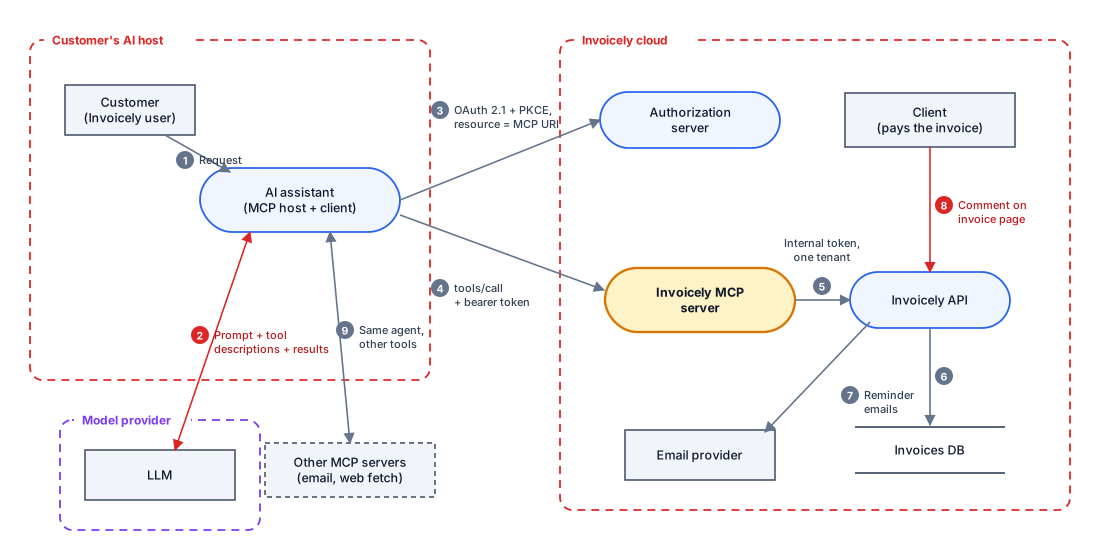
Flow 4 is the one everyone draws. Flows 2 and 8 are the ones that matter. A client types a comment on an invoice. Invoicely stores it and returns it when an assistant calls get_invoice. The customer's assistant then puts that comment into the model's context, next to the user's request and the descriptions of every tool it can call. Flow 9 matters too: Invoicely's tools sit in the same agent as whatever other servers the customer has connected, and Invoicely can't see which ones those are.
Step 2: The three boundaries people miss
A trust boundary is anywhere data or control passes between parties that trust each other differently. An MCP server has three that a quick review usually skips.
1. The context window. Models don't reliably tell data from instructions. Any text your tools return can steer the agent, and so can your tool descriptions. The prompt injection doesn't happen in your server, but your server is how it gets in. If a tool returns text written by someone other than the user, such as comments, ticket bodies, emails, web pages or file contents, mark that flow as untrusted input to the model.
2. The server's credentials. The server acts on users' behalf, so it's a deputy, and confused deputies are the classic failure. The specification is strict here. A server must check that every access token was issued for it (its audience), and must not accept or pass on tokens meant for anything else. Forwarding the client's token straight to a downstream API, called token passthrough, is explicitly forbidden. If your server is a proxy to a third-party API that uses one static OAuth client ID, the specification also requires your server to ask each client for consent before sending the user on to the third party. Without that, a consent cookie the user already has can approve an attacker's client without the user being asked.
3. The install path. A server someone installs is code they run, and whoever publishes the next version decides what that code does. This matters most for servers your teams install, covered at the end.
Together, the first two lead to one design rule: assume the agent calling your tools has been hijacked. Simon Willison's lethal trifecta explains why. An agent with access to private data, exposure to untrusted content and a way to send data out can be made to steal the data. Invoicely's server supplies all three by itself: invoices are the private data, client comments are the untrusted content and send_reminder is the way out.
Step 3: STRIDE against what the spec requires
Run STRIDE over the MCP server and, where the specification has a rule, write it next to the threat. The "MUST" and "SHOULD" wording below quotes the 2026-07-28 revision. A rule the spec puts on clients, such as asking the user before sensitive operations, is something you can't rely on, because you don't control the customer's client.
| STRIDE | Threat to Invoicely's MCP server | What the spec says |
|---|---|---|
| Spoofing | The server accepts a token issued for something else, such as Invoicely's web API, or passes the client's token through to the API. | Servers MUST check that tokens were issued for them as the audience (RFC 8707) and MUST NOT accept or pass on other tokens. |
| Spoofing | Another user guesses or obtains a draft invoice handle from create_invoice and uses it. | Servers MUST NOT treat holding a state handle as authentication, and SHOULD bind each handle to the user ID taken from the verified token. |
| Tampering | A hijacked agent calls send_reminder or create_invoice with arguments the attacker chose. | Servers MUST validate all tool inputs and enforce access control. Clients SHOULD ask the user to confirm sensitive operations, but that's out of Invoicely's hands. |
| Repudiation | Nobody can tell which user, through which client, sent a reminder or read an invoice. | Clients SHOULD log tool use. Logging on the server side is up to you. |
| Info disclosure | Tool results from one customer's account reach another, for example through a cache keyed only by invoice ID. | Servers MUST enforce access control. This is the IDOR from the original model in a new form. |
| Info disclosure | One broad scope grants everything, so a leaked token reads and sends from the whole account. | Ask for minimal scopes first and step up for more when needed (scope minimisation guidance). |
| Denial of service | An agent stuck in a loop, or told to, pages through every invoice or sends hundreds of reminders. | Servers MUST rate limit tool calls. |
| Elevation | The server calls the API with one service credential that can reach every customer's account. | Not covered by the spec. That's your design (flow 5). |
Two rules in the specification are aimed at clients, not servers, and still belong in a threat model of a server. A malicious server can feed a client URLs that point at internal addresses during OAuth discovery (server-side request forgery). It can also hand over authorization URLs that inject scripts or shell commands. That's exactly what CVE-2025-6514 was. If you run an MCP client anywhere, for example an internal agent platform, model those threats against it too.
Step 4: An attack tree for the outcome that matters
The worst realistic outcome isn't "an attacker calls a tool". It's a customer's invoices ending up with someone else. The attack tree follows the trifecta: getting there needs all three branches, so the root is an AND gate. Leaves are scored likelihood × impact on the same 5×5 risk matrix as the original Invoicely model.
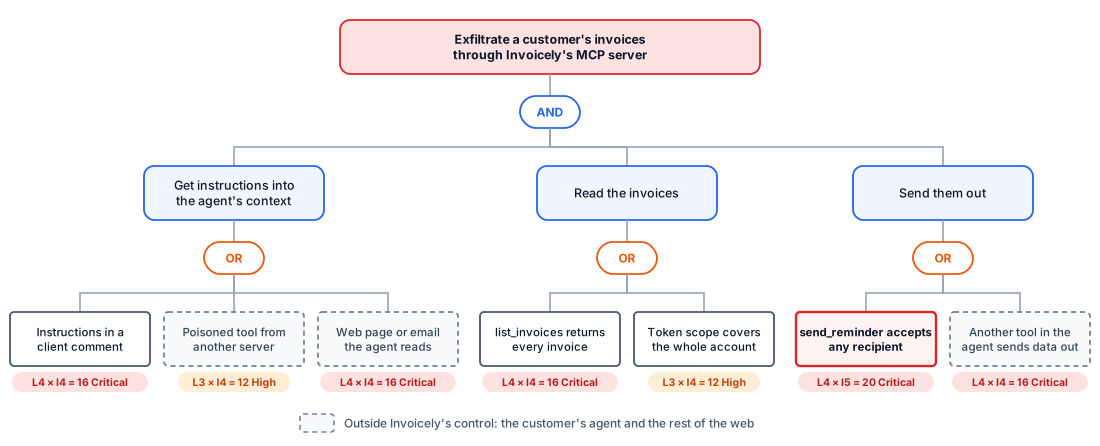
Read it from the left. Invoicely can't close the first branch. Prompt injection has no reliable fix, and two of its three leaves live in the customer's agent anyway. That's uncomfortable, and the tree is useful because it makes you say it. The work therefore goes into the branches Invoicely owns. If send_reminder can only ever email the client already on the invoice, Invoicely's server no longer supplies the way out. If list_invoices returns 25 summaries rather than the whole account, whatever does leave through another route is small.
The remaining leaf, another tool in the same agent, belongs to the customer. Invoicely's model records it as an assumption ("customers may connect tools that send data out") rather than pretending it isn't there.
Step 5: Score it and build the register
Here's the risk register for the server, with each threat scored, treated and owned. The IDs carry on from the original model's T1 to T10.
| # | Threat | L × I | Treatment | Owner |
|---|---|---|---|---|
| M1 | send_reminder accepts any recipient | 4 × 5 = 20 | Mitigate: the recipient is always the client address on the invoice, with no free-text recipient or CC. The email body comes from a template, not model text. A reminders:send scope through step-up, and a daily cap per account. | Engineering lead |
| M2 | Instructions hidden in client comments | 4 × 4 = 16 | Mitigate partly: comments come back in their own field labelled as written by the client, only from get_invoice and never in lists. Accept the residual risk, because no filter reliably stops prompt injection. Review whenever a tool is added. | Product lead |
| M3 | list_invoices returns the whole account | 4 × 4 = 16 | Mitigate: 25 results per page, summary fields only, full detail only from get_invoice, and a rate limit per token. | Engineering lead |
| M4 | Token audience not checked, or token passed through | 3 × 5 = 15 | Mitigate: reject any token whose audience isn't the server's own URI. Exchange it for a short-lived internal token limited to one customer's account. Never forward the client's token. | Platform |
| M5 | Results from one account reach another | 3 × 5 = 15 | Mitigate: tools go through the same authorisation layer that fixed T2. Cache keys include the account. Tests call every tool as another customer. | Engineering lead |
| M6 | One broad scope for everything | 3 × 4 = 12 | Mitigate: publish only invoices:read as the starting scope. invoices:write and reminders:send come through step-up challenges. | Platform |
| M7 | Tool calls not logged | 3 × 3 = 9 | Mitigate: log tool name, arguments, user, OAuth client, account and result count for every call. | Engineering lead |
| M8 | Guessable draft invoice handles | 2 × 4 = 8 | Mitigate: random handles, stored against the user ID from the token and rejected for anyone else. | Engineering lead |
M2 is the honest row. It's scored, it has an owner, and its treatment says out loud that part of the risk stays. That's what compensating controls are for: M1 and M3 are the reason M2's leftover risk is acceptable. If a future version adds a tool that can send arbitrary email, M2's score has to be reopened, so record that as a trigger in its notes. Changes like that are a standard reason to re-threat model.
If you install MCP servers rather than build them
Most companies install far more MCP servers than they build: developers connect code hosts, ticket trackers, databases and browsers to their assistants. Each of those servers belongs on a diagram as a third party in its own trust boundary, the same way as any vendor integration. The difference is that a local server is code running on an employee's laptop with that employee's access.
| Threat | Where it's happened | Treatment |
|---|---|---|
| Impostor or backdoored package | postmark-mcp, 2025 | Install from the vendor's own repository or listing. Pin exact versions and read the diff before updating. Prefer the vendor's hosted remote server to a community copy. |
| A malicious server attacks the client | mcp-remote, CVE-2025-6514 | Keep clients and connection helpers patched like any other software. Connect only to servers you'd trust to hand you URLs. |
| Tool descriptions change after approval | Shown in tool poisoning research | A server can change its tool list at any time. Pin versions, and treat a changed description like a code change that needs review. |
| Local server runs with the user's privileges | The spec's own example: a startup command that sends ~/.ssh/id_rsa to a remote host | Run local servers in a sandbox or container with limited file and network access. Use stdio rather than an HTTP port on localhost. |
| Token reaches more than the task needs | GitHub MCP, 2025 | Fine-grained tokens limited to the repositories or projects the task needs. Separate agents or profiles for public and private work. |
| A toxic combination of servers | The trifecta, spread across several servers | Don't give one agent a server that reads private data, one that reads untrusted content and one that can send data out, unless every send needs the user's approval. |
This is a supply chain problem with a shorter fuse. A malicious npm library has to wait until your code calls it. An MCP server runs as soon as someone connects it, and the model decides when to call its tools.
What threat modeling can't do here
- It can't make a model immune to prompt injection. No system prompt, filter or delimiter reliably stops it as of October 2026. The model treats injection as a given and limits what a hijacked agent can do.
- It can't review community servers' code for you. It records which servers you've decided to trust, why, and who owns that decision.
- It can't control your customers' agents. If you ship a server, you can't see what else your customers connect, or whether their client asks before sensitive calls. Write those down as assumptions so nobody mistakes them for controls.
- It can't keep up with the specification by itself. The authorization rules have changed in every revision since March 2025, and the 2026-07-28 revision dropped protocol sessions entirely. Re-check the model when you move to a new revision.
A checklist for your MCP server
- Draw the host, client, server, authorization server and every API the server calls, with the model as an external entity.
- Mark every tool result that can contain text written by someone other than the user as untrusted input to the model.
- Check whether your server alone supplies private data, untrusted content and a way to send data out. If it does, break one of the three.
- Remove free-text recipients, URLs and destinations from any tool that sends data out of your system.
- Check every token's audience. Never pass a client's token downstream, and use an internal token limited to one account.
- Start with a read-only scope and require step-up for writes and sends.
- Cap result sizes and rate limit every tool.
- Bind state handles to the user from the verified token.
- Log every tool call with user, client, account and arguments.
- Write down what you assume about the customer's agent, and say plainly which risks you've accepted.
Sources, as of 25 October 2026: the MCP specification's security best practices, authorization and tools pages for revision 2026-07-28, plus the incident write-ups linked above.
Frequently asked questions
Is an MCP server just an API?
On the network side, yes, and everything you'd do for an API still applies: authentication, authorisation, input validation and rate limits. The difference is who calls it. The caller is a model acting on instructions that may not be the user's, and what your server returns goes back into that model's context. So a threat model of an MCP server adds two questions an API review usually skips: what could someone else's text in my results make the agent do, and what can a hijacked agent do with my tools?
What are the main security risks of MCP servers?
For a server you build: prompt injection carried in tool results, tools a hijacked agent can use to send data out, tokens not checked for audience or passed through to other APIs, results leaking between customers, and scopes that are too broad. For servers you install: impostor or backdoored packages, servers that change their tools after you approve them, local servers running with your privileges, and tokens that reach more than the task needs.
How do I stop prompt injection through MCP tools?
You can't stop it reliably, so design for it. Return text written by other people in clearly labelled fields, and only from tools that need it. Make sure the tools that send data out can't be pointed at an address the attacker chooses. Keep read results small. The goal is that a hijacked agent can't do much damage, not that the agent never gets hijacked.
Should every MCP tool require human approval?
The specification says there should always be a human able to deny tool calls, and that clients should ask for confirmation on sensitive operations. In practice, approval prompts on every read train people to click "allow". Put approval on actions that send data out, change money or delete things, and make read tools safe enough to run without it. If you ship the server, remember the approval prompt is the client's job, so your own limits have to hold without it.
How do I check a third-party MCP server before installing it?
Confirm the publisher is the vendor it claims to be, and install from the vendor's own repository or listing. Read what the tool descriptions say and what credentials the server asks for. Pin the version and review changes before updating. Run local servers in a sandbox. Then add the server to your data flow diagram as a third party with an owner, so the next review knows it's there.